
DBC: 2026 Release Notes
Welcome to the latest update for DB Commerce! In our releases, we've focused on both enhancing your experience and resolving key issues. We've made significant improvements and implemented exciting new features that will streamline navigation, increase performance, and make your journey even smoother. Additionally, we've addressed several bugs that were impacting site functionality and fixed issues to ensure a more reliable and efficient platform.
As always, our team is committed to delivering continuous improvements to provide you with the best experience possible. Below, you'll find the details of what has been fixed, updated, and introduced.
2026 Release Schedule
1/6, 1/28, 2/18, 3/11, 3/25, 4/22, 5/13, 6/3, 6/24, 7/15, 8/5, 8/19, 9/16, 10/7, 10/28, 11/18,12/9, 1/6/2027
Sprint: R26-14 | Release Date: 10.7.2026
NEW FEATURES
-
Real-time freight rates at checkout will now come from ShipStation for UPS, FedEx and USPS. Users see live carrier rates for their order, and your existing freight rules still apply on top of those rates: markups, heavy-item and lot freight, and freight minimums. This release brings ShipStation rates to the legacy interface as well as the Responsive interface.
Your current EasyPost set up will remain in place until the switch to use ShipStation rates is made. If you haven't set it up yet:
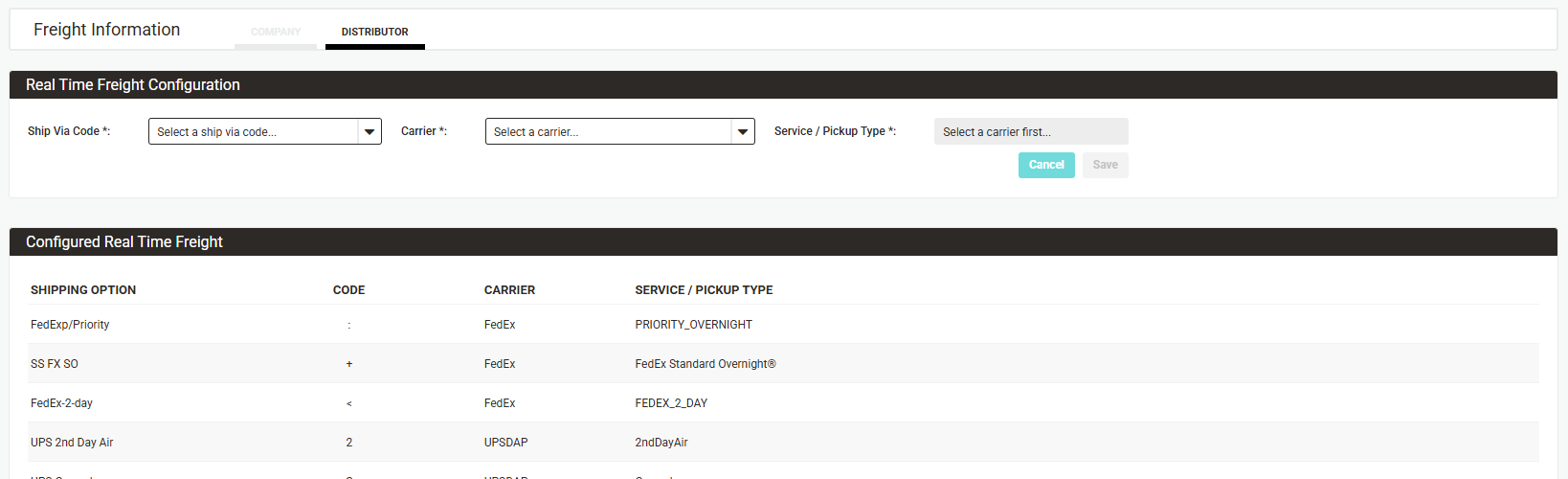
- In Distributor Admin, go to Checkout > Freight > Freight Information and select the Distributor tab.
- Under Real Time Freight Configuration, choose a Ship Via Code, then a Carrier, then a Service/Pickup Type (for example, UPS Ground).
- Click Save. The ship via code appears in the Configured Real Time Freight table below.
-
Repeat for each ship via code that should use live rates. To change or remove one, hover over its row and use the edit or delete icon.
No more $0 freight by mistake. If ShipStation can't return a rate, users won't be able to check out with $0 freight. Instead, they'll see a message asking them to try again in a few minutes or to email your support address for help. The message uses the Support Email set in your site properties.
There's no rush to switch, but DemandBridge will end its relationship with EasyPost by the end of the year. If you haven't moved to ShipStation by then, our team will reach out to help you make the transition. Questions or concerns in the meantime? Our support team is happy to help.
-
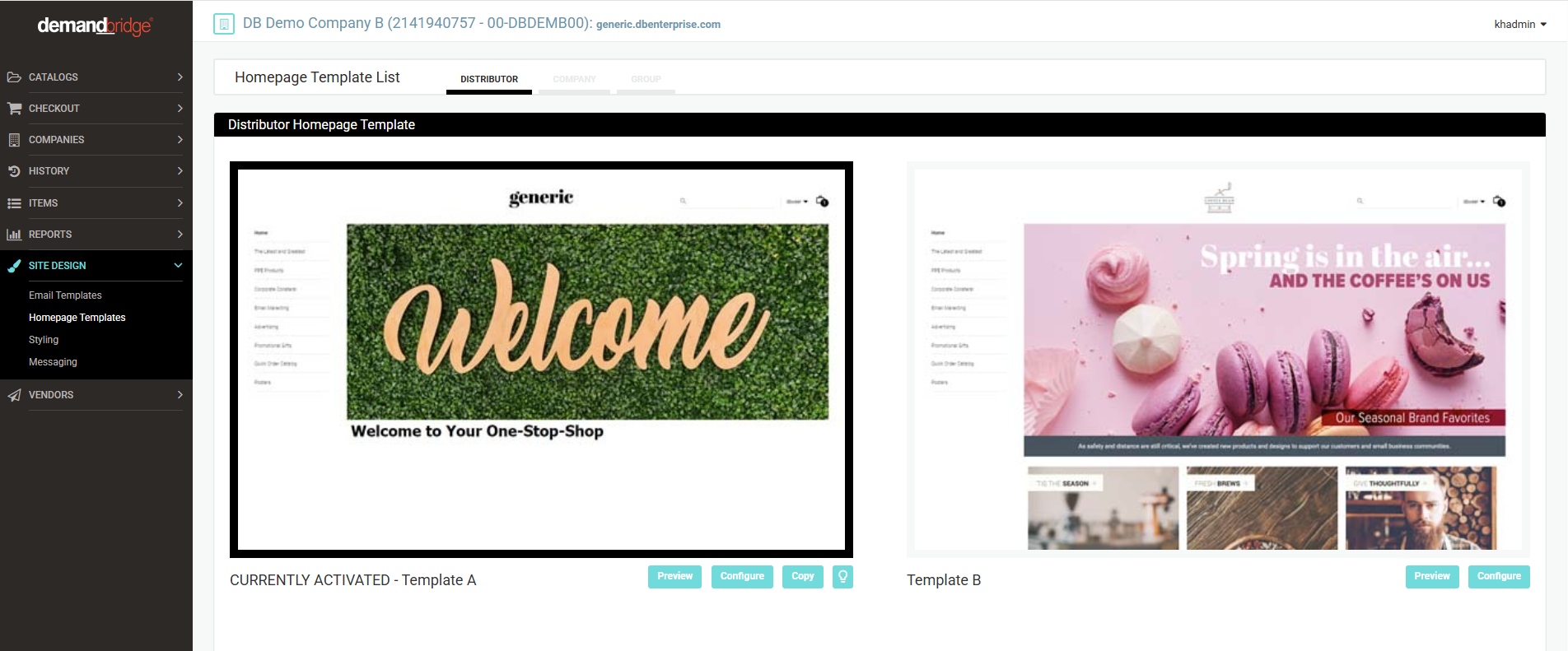
Until now, homepages were set up company by company, and any company without one showed Template A. You can now build a single distributor-level homepage. Every company and group that doesn't have its own homepage will show it automatically. This is especially handy when you bring new companies online: they get your branded homepage from day one.
In Distributor Admin, go to Site Design > Homepage Template List. Select the new Distributor tab (it's first in the list). Template A is selected to start. Choose and configure your template, then Save.
Companies and groups that already have their own homepage keep it. Nothing changes for them. On the Company tab, new Activate/Deactivate buttons let you turn off a company's own homepage. When it's off, that company shows the distributor homepage instead. A new Assignments button shows which companies have their own template, and which template each one uses.
-
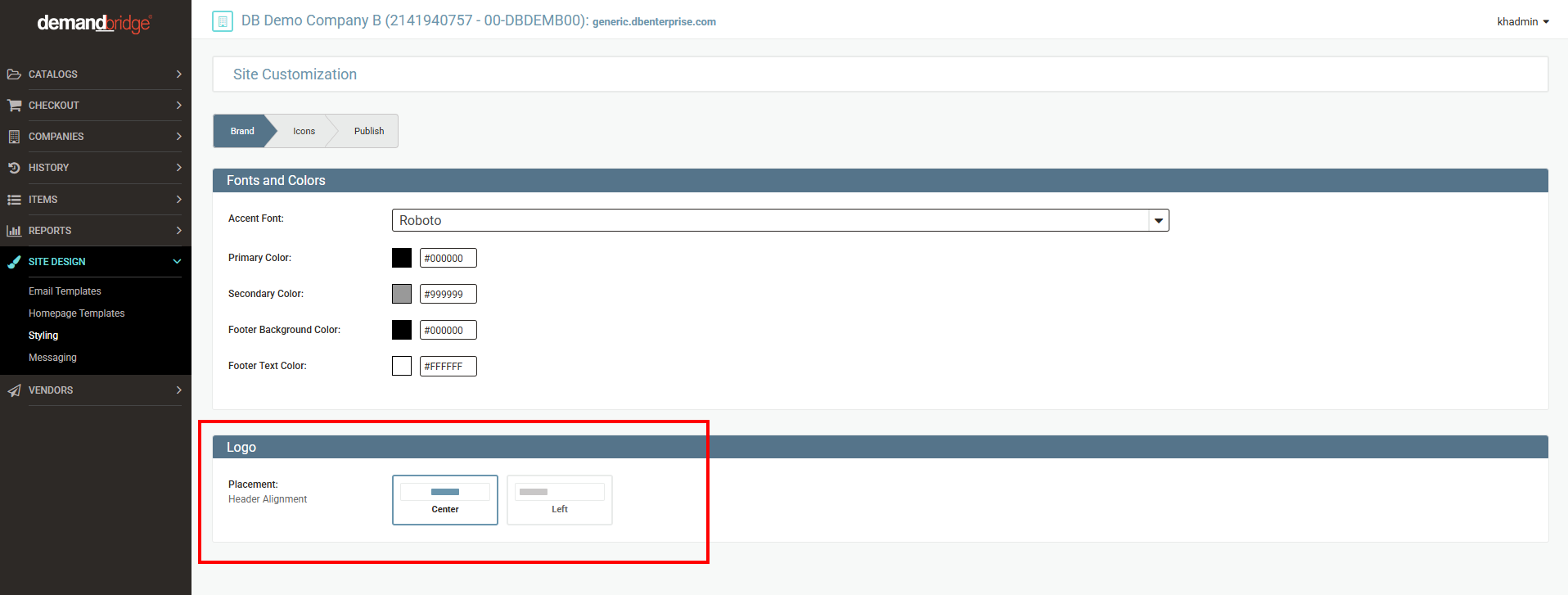
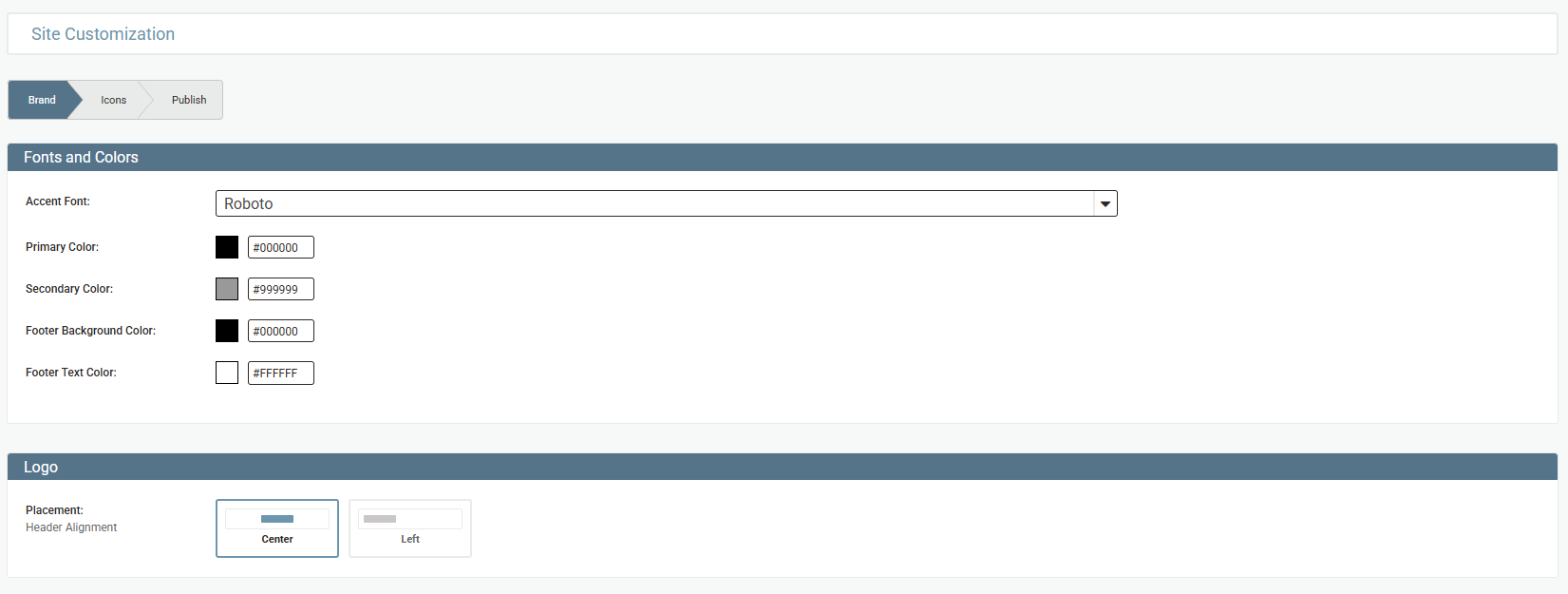
Admins can now place the customer logo on the left or in the center of the header on your Responsive site. Before, a left-aligned logo was only possible with the Office Products feature turned on.
Go to Site Design > Styling > Brand and find the Logo section. Choose Center or Left. Go to the Publish tab to apply the change to your site.
-
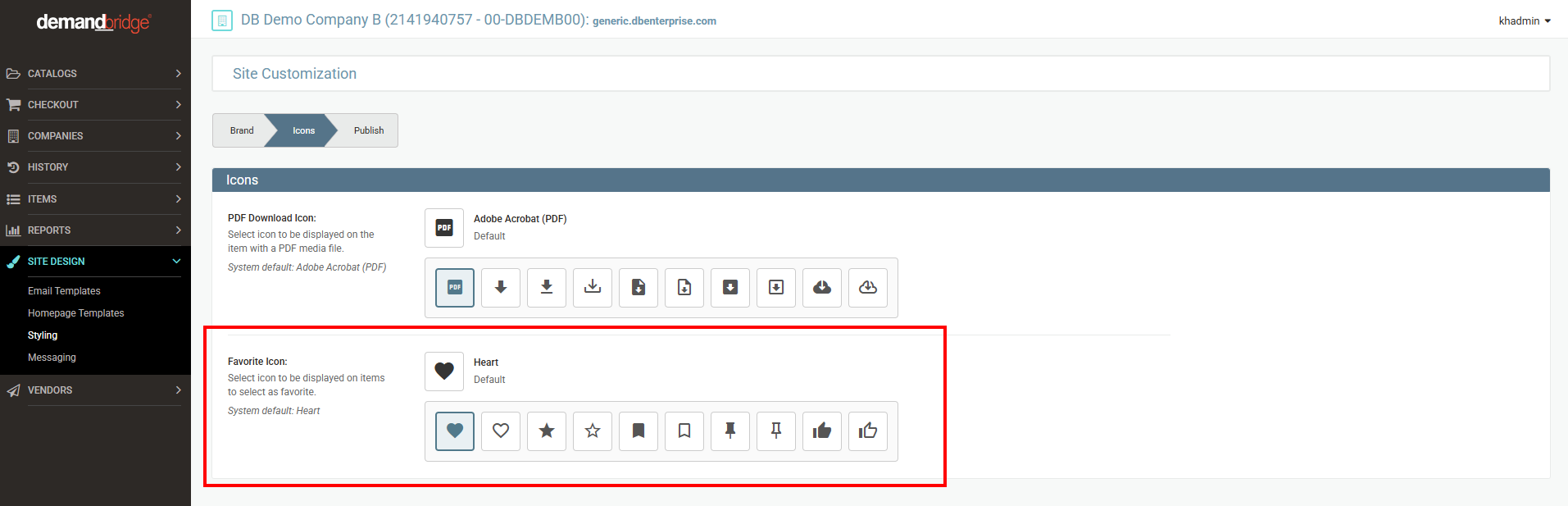
Users mark items as favorites with a heart icon. Admins can now swap it for a star, bookmark, pin or thumbs-up, in a filled or outline style, so it fits your brand.
Go to Site Design > Styling > Icons and find Favorite Icon. Click the icon you want. The selected icon is highlighted and its name appears above the grid. Go to the Publish tab to apply the change to your site.
-
Admins could already hold orders for a single company so they aren't sent to DBd. They can now do the same for the entire distributor with one switch. This is useful during an upgrade, a system migration or a year-end close.
Turn the distributor-level hold on in Distributor Admin, and orders stop going into DBd. Turn it off when you're ready, and orders flow again. Unlike the company-level hold, there's no automatic release date: you turn the hold off yourself. (This only applies to distributors using the DBd backoffice.)

IMPROVEMENTS
- Some orders are split into more than one order number. Tracking for these orders now shows correctly in order history, and users now get their delivery notifications.
- If you set up templated (Chili) items, the scripts you enter for an item's fields are now checked when you click Save. If something is formatted incorrectly, you'll see an error that shows where the problem is, so you can fix it before saving.
- Anywhere you see Company and Distributor tabs in admin, they now read Distributor / Company. This matches how settings flow: from your distributor down to each company and in some areas group.
-
The Site Design > Styling page used to be one long list. It's now split into multiple tabs, so you can go straight to what you need. All of your existing settings are still here. They've just moved into the tab where they fit best. Remember to visit the Publish tab after making changes. This area will continue to grow over the next few releases.
- The Mobile Eligible permission, which sent mobile users to the legacy site for complex items, has been removed. Items that were marked as not mobile-eligible now work normally for mobile users.
- On the Responsive interface, order form catalogs showed "Max Order Qty: 0" for items with no maximum. That made it look like the item couldn't be ordered at all. The maximum is now hidden when it's zero or not set, just as the minimum already was. Order form catalogs now match the item detail page, and any minimum or maximum you have set still shows as usual.
- The Additional Information section on an item page is now hidden when the item has no extra details to show. Users no longer see an empty section on the Responsive Interface.
RESOLVED BUGS
- On some promo items, choosing one color or logo would lock out other valid choices. Users can now move freely between any combination that's available.
- When you delete a group that was assigned to a spending account, the other groups now show correctly in the Available and Selected lists.
- When a user picks a custom address at checkout and checks Save as Default, that address is now pre-selected on their next order. Whatever address they used last becomes their default.
- If a company uses Send Freight to Order Notepad, freight charges now appear in the notepad on every order, no matter how the order was paid or what other notes it has.
- Reorder notices were being sent repeatedly in a limited number of cases. This has been updated to properly send the notifications only once.
Sprint: R26-13 | Release Date: 9.16.2026
IMPROVEMENTS
Storefront
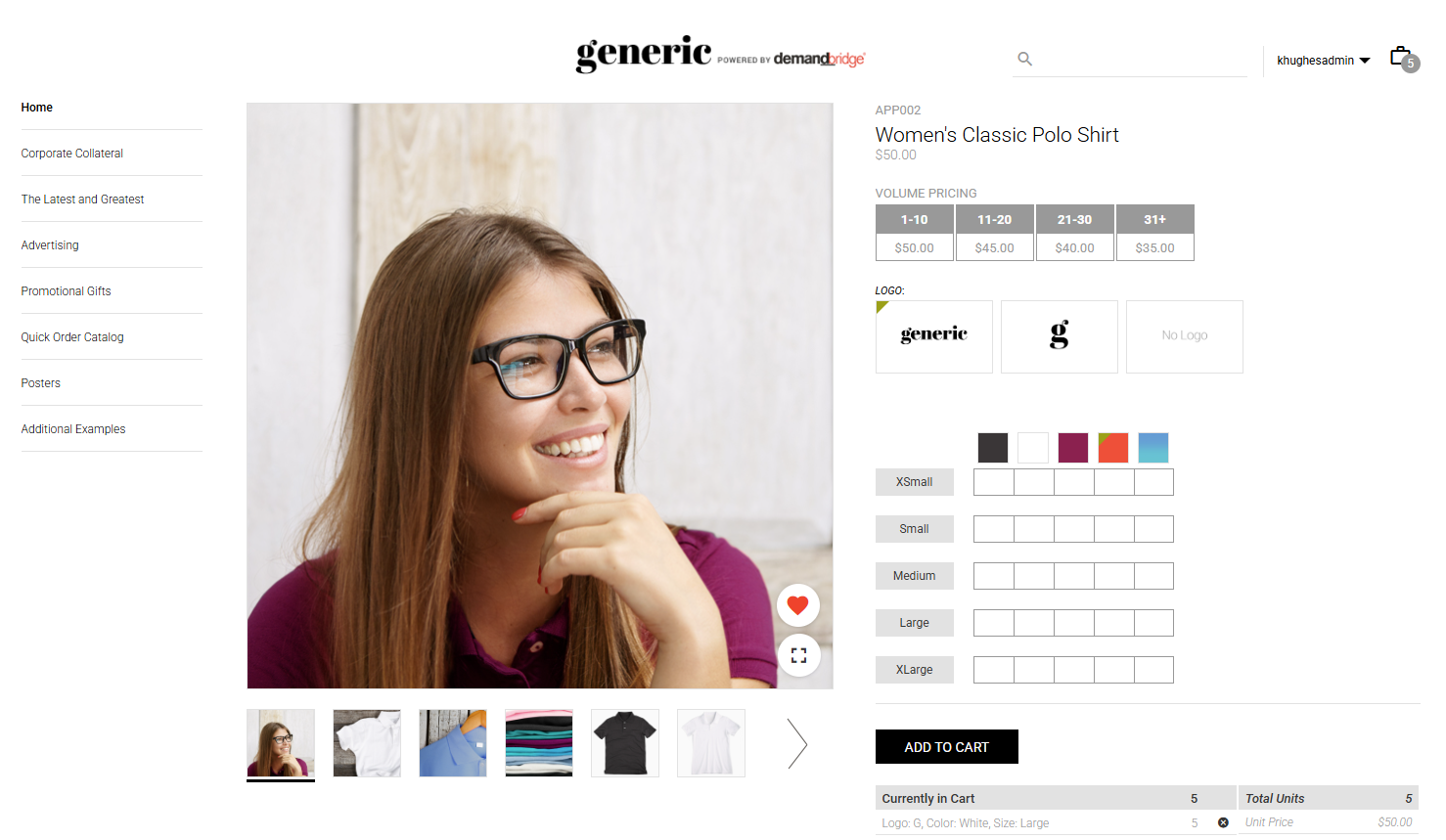
- Favorite Items are now available to all users on the Responsive storefront — the permission gate has been removed. Each user has a single, simplified favorites list (multiple named lists are no longer supported).
- Favorite or unfavorite an item from its detail page
- Add favorited items straight to the bag
Additional enhancements, including more ways to manage favorites and admin-level configuration, are planned for our next release.
-
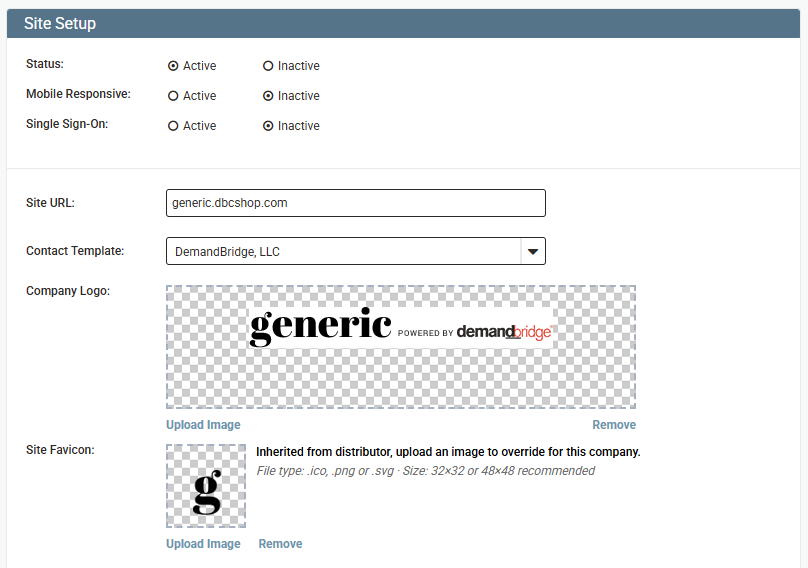
For the Responsive Interface, added the option to set a company-level favicon in New Distributor Admin, with automatic inheritance from the distributor-level favicon when no company override is set. This is located under Site Setup, in the "Site Favicon" field below Company Logo (accepts .ico, .png, .svg; 32×32 or 48×48 recommended). Distributor-level favicons are set the same way and cascade down to companies unless overridden.

-
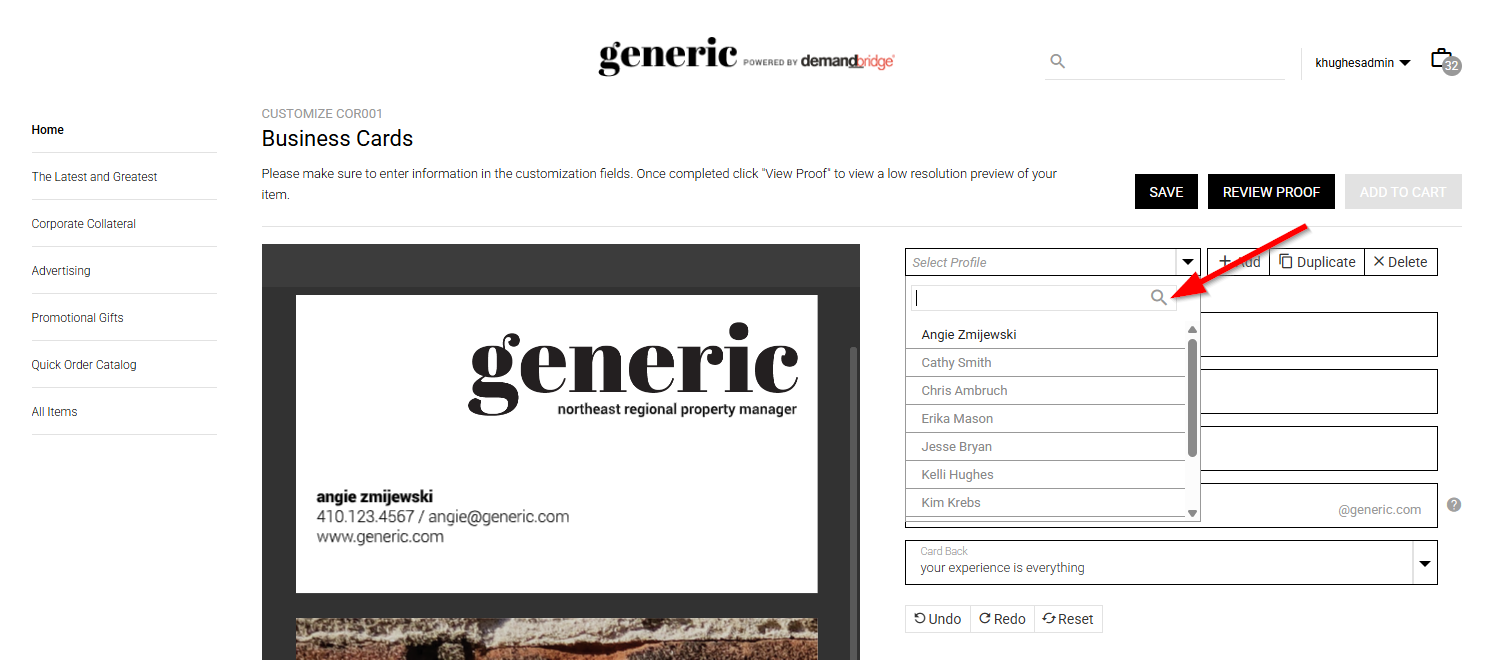
No more scrolling through long user lists, User Profiles lists now have a search filter with the same look and behavior as the existing Company Profiles search.
- The Responsive Interface now obeys the item-level "Requisition Maximum" field set in the backoffice, serving as a global order limit for the item, matching how it has always worked on Legacy. This eliminates the need to manually re-create per-group order limits.
- Unhandled errors in the Responsive Interface now show a branded, friendly error page instead of a "Whitelabel" error page with error code.
- Retired the legacy JCR-backed "My Images" implementation now that the Chili-based replacement has completed its soak period; also removed the "My Images" section from the legacy profile area.
Admin & Account Management
-
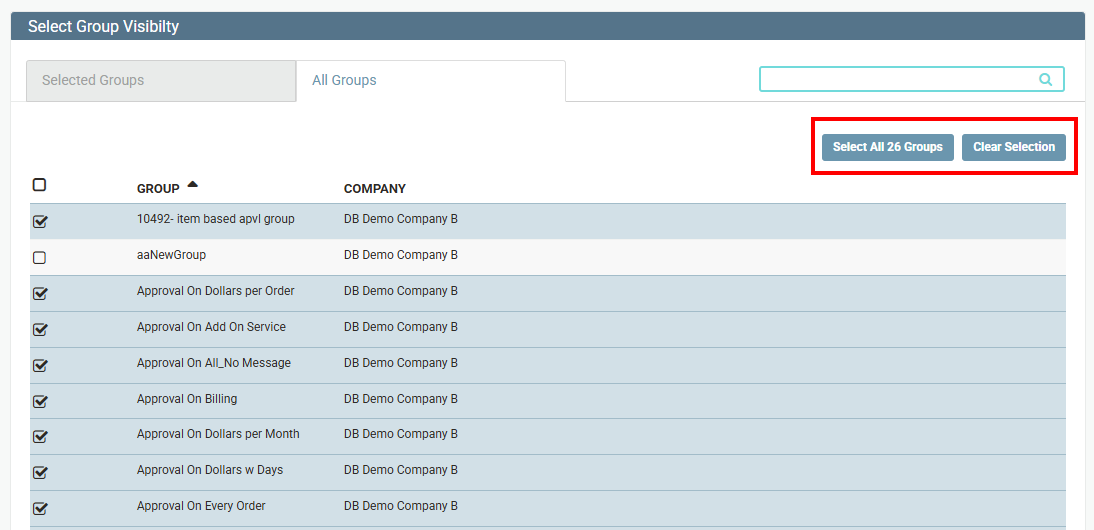
Admins managing catalog visibility for companies with many groups can now select every group for a company in one click, instead of only selecting what's visible on the current page. Selections persist across pages, and a confirmation modal guards against accidental bulk changes.
- Country can now be shown as part of a location's customer-facing display value for Shipping and Billing addresses.
-
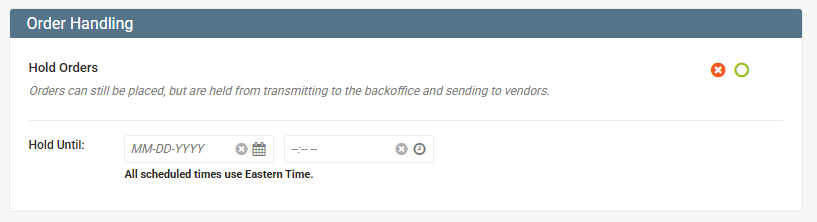
The "Hold Orders" feature, hold a company's orders from transmitting to the vendor/back office, optionally until a set date/time, has been migrated from Legacy Distributor Admin to New Dist Admin with a red/green toggle. Functionality is unchanged from legacy, just relocated under Company > Company Overview, new Order Handling section.
- Enhanced the vendor tracking file process for multi-company orders to recognize tracking numbers reported against either the primary order number or the split order number, where previously only the primary order number was recognized.
- The error/exception lookup feature has been removed from Legacy Distributor Admin. Going forward, please provide the error code to Support so they can triage the issue.
Security
- The Responsive Interface now locks an account after 6 repeated failed login attempts with a 10-minute temporary lockout, rather than allowing unlimited retries. Locked users see an appropriate message, the lockout auto-clears after the window, and self-service password reset still works while locked.
RESOLVED BUGS - RESPONSIVE
- Fixed an issue where bulk group assignment in New Distributor Admin could assign all selected users to the same (incorrect) group.
- Resolved an issue where the Catalog Quick Links, Item Quick Links, and Groups search dropdowns on the splash page builder were not filtering results.
- Deleting a freight matrix now properly removes it from all shipping options where it was previously applied.
- Fixed the User Budgets page in Spending Accounts failing to load for groups with a large number of users.
- Updated the Chili customize page rendering zero variable fields for certain saved documents.
- Corrected an issue where the "Default to this shipping location" checkbox in Responsive Checkout did not remain checked after being selected.
- Addressed a billing issue where credit card orders modified by an approver in Approval Center did not update to reflect the new amount to be authorized/charged.
- Vendor FTP transmissions using the unzipped file delivery method had incorrectly named .txt files for multi-company orders. File names are now correctly generated based on the order number assigned to each line, properly accounting for multi-company orders.
Sprint: R26-12 | Release Date: 8.19.2026
IMPROVEMENTS
- Extended address verification to also validate the city field (in addition to address lines and ZIP) when a new custom shipping address is entered.
- Improved the workflow of a Tap-Out sub catalog, so clicking a sub-catalog from the catalog list or sub-catalog thumbnail now taps out immediately, matching legacy behavior, instead of drilling deeper into the catalog structure unnecessarily.
- The shipping address country is now correctly saved for punchout orders with non-U.S. shipping addresses.
- Updated the "Force Cost Center" feature so it correctly uses the buyer account's location code (instead of the site customer code) when an order is placed under a group with an assigned buyer account.
RESOLVED BUGS - RESPONSIVE
- Fixed an issue in Responsive Checkout where editing a saved custom location for a non-U.S. country failed to load the correct state list.
- Fixed an issue where searching for an individual item code within an item group returned no results, even though the item group itself was searchable.
- Fixed an issue where the primary approval group/approver stopped displaying correctly once an "Approval Price Matrix By Amount" rule was added.
Sprint: R26-11 | Release Date: 8.5.2026
IMPROVEMENTS
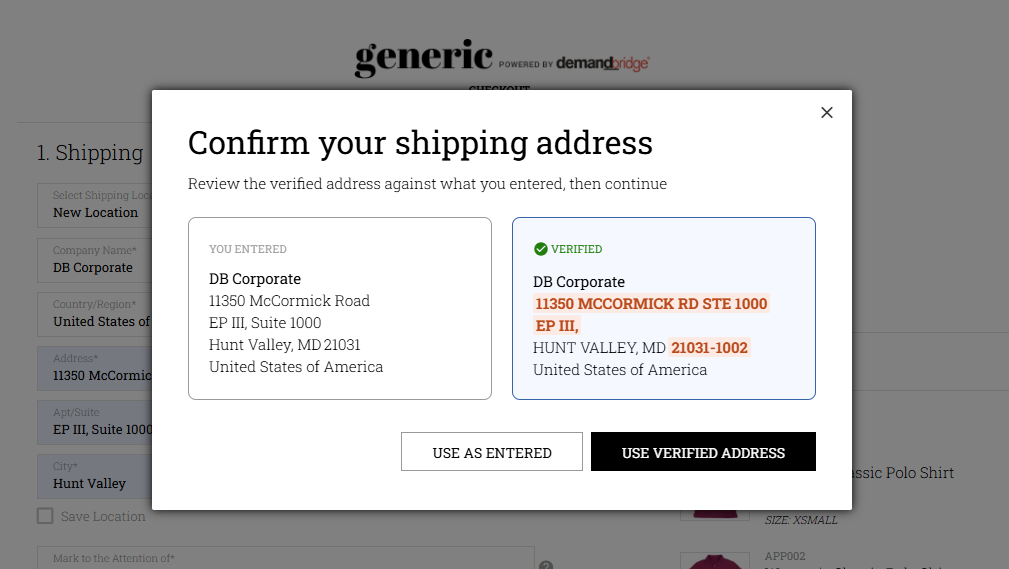
- Responsive checkout can now verify shipping addresses in real time when a user enters a new custom address, helping reduce shipping errors and delivery issues.
- If the address is verified, users see a side-by-side comparison of what they entered versus the suggested/corrected address, and can choose to use either one.
- If an address can't be verified, users see a warning and can either proceed with the address as entered or go back and fix it. Checkout is never blocked, verification only warns, it never prevents an order from completing.
- Verification only applies to custom-entered addresses (not saved/back-office addresses).
-
Withing New Dist Admin > Order History admins have insight to the address verification status (Verified or Overridden) and address verification (Residential, Commercial or Unknown.).
How to turn it on
This feature is off by default and must be enabled in Distributor Admin:
1. Go to Checkout > Locations > Location Permissions.
2. Under the Location Permissions section, enable the new "Allow address verification" permission (available at both the Distributor and Company level).
3. Turn it on at the Distributor level to apply it broadly, or at the Company level to enable it for a specific company. Company-level settings override the distributor default when set.
-
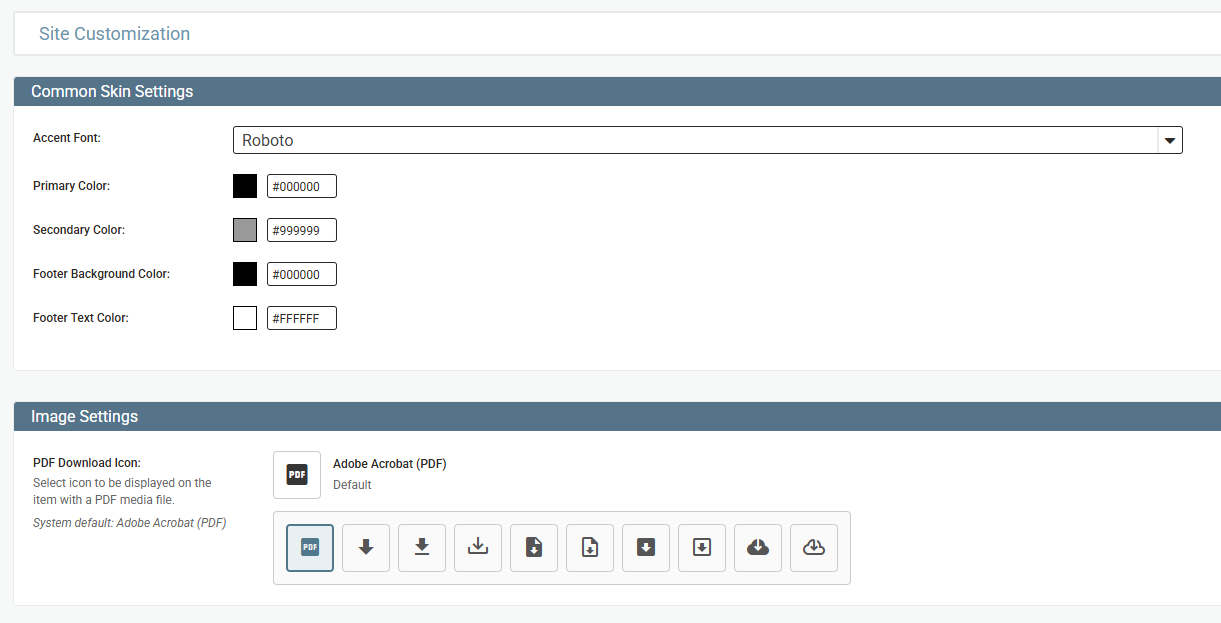
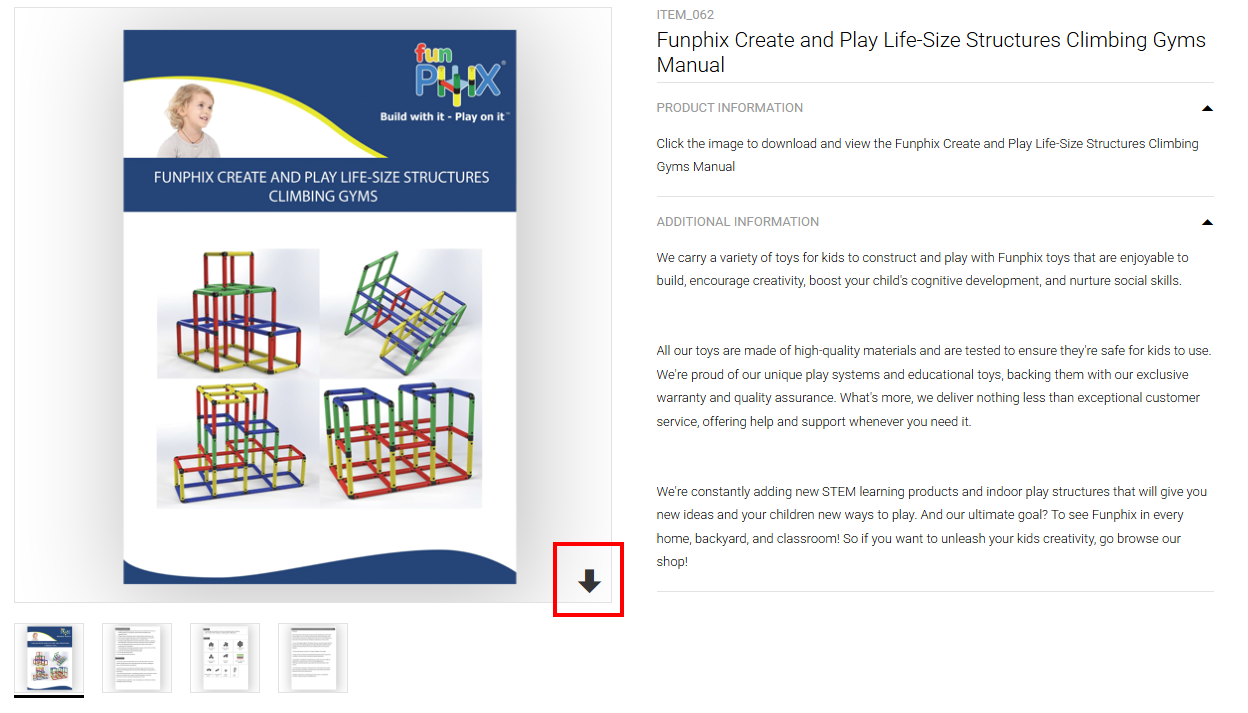
Admins can now choose the icon shown next to downloadable PDF files on item detail pages. In New Dist Admin under Styling, a new Image Settings section lets you pick from 10 standardized icon styles (in place of the default Adobe Acrobat icon) and reset to default at any time.
-
For customizable items, you can now delete images you've uploaded to "My Images" directly from within the modal. Hover over a thumbnail to reveal a delete icon, and you'll be asked to confirm before the image is permanently removed. Once deleted, an image can't be restored, it will need to be re-uploaded if needed again.
-
The "My Images" tab in the image picker now includes a search box, so you can quickly find your uploaded images by name instead of scrolling through the full list.
-
In Distributor Admin User Management, editing and deleting a user from any page of the list (e.g., page 5) no longer bounces you back to page 1, you stay right where you were.
-
For DBd customers, a new "Add Spending Account to Notepad" permission is available under Company > Permissions. When enabled, the spending account name(s) and amount(s) applied to an order are automatically recorded in the order notepad.
-
For DBd customers, custom address fields (Address 1, Address 2, City, State, Zip) in Responsive checkout now enforce DB/d's character limits, so entries are no longer silently truncated later on (no admin maintenance is needed):
Address 1 — 30 characters
Address 2 — 30 characters
City — 16 characters
State — selected via dropdown (2-character state code)
Zip — 9 characters
- Added support for a streamlined punchout flow where a partner sends a specific item directly to the user. The user goes straight to that item's page (no catalog browsing) and adding it to cart returns them to the punchout partner immediately, no cart or checkout screens shown.
RESOLVED BUGS - RESPONSIVE
- Fixed an issue where freight matrix rules (like markups) were being incorrectly applied on top of the freight minimum instead of the calculated freight. Freight minimums now calculate correctly.
Sprint: R26-10 | Release Date: 7.15.2026
COMING SOON: Address Verification
We're excited to share that Address Verification is currently in development! This upcoming feature will help ensure address accuracy and reduce errors during data entry. We're targeting an expected delivery of August 5th, though this date is subject to change as development progresses. Stay tuned for more details. (Only available within the Responsive Interface.)
IMPROVEMENTS
-
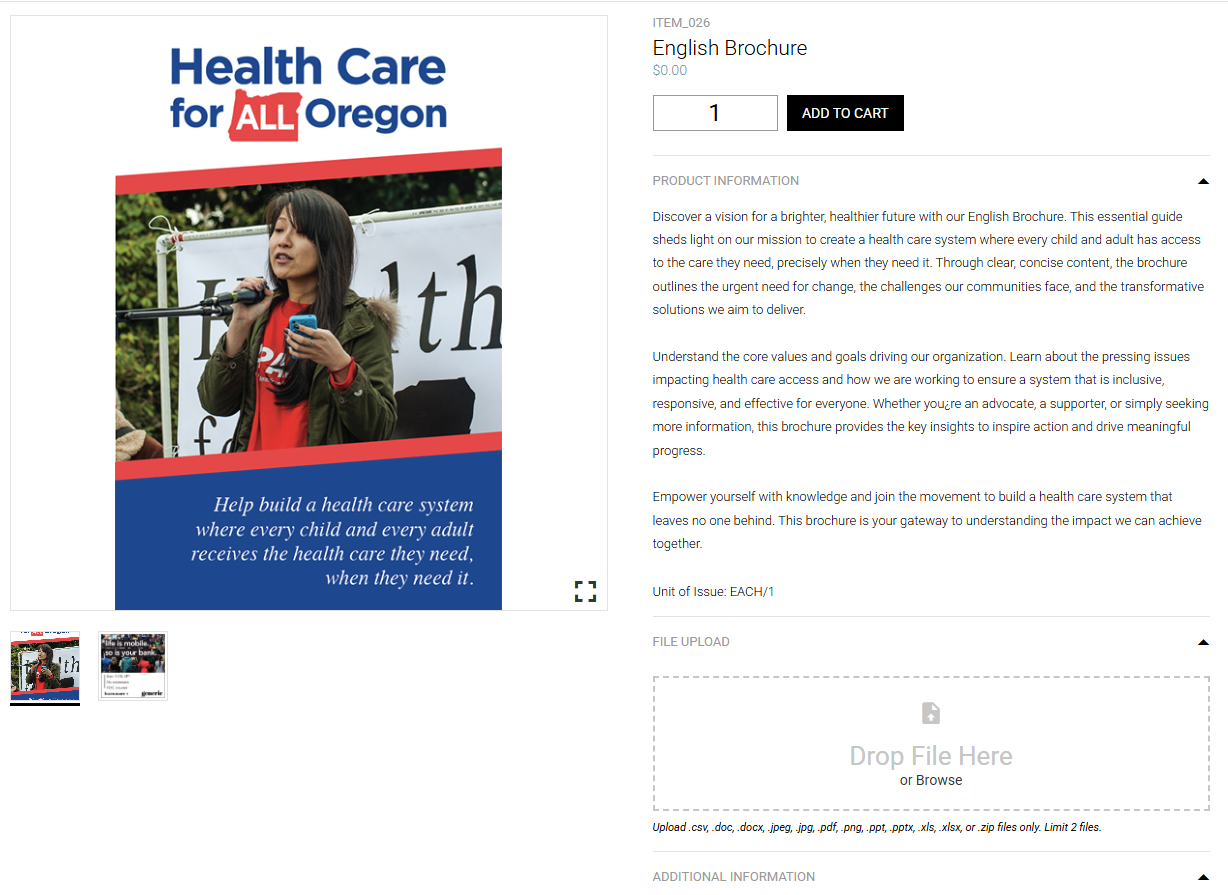
You can now attach files directly on the item detail page for Static POD items before adding them to your cart within the Responsive Interface. Supported file types include .csv, .doc, .docx, .jpeg, .jpg, .pdf, .png, .ppt, .pptx, .xls, .xlsx, and .zip, with a limit of 2 files per item. Drag and drop a file or click to browse, once uploaded, you'll see the filename displayed for confirmation, and you can remove a file before checking out. Uploaded files travel with the item through to the order.
Admins can enable this feature per Simple Items (Static POD) and choose whether the upload is required or optional. When required, an asterisk indicates the upload is needed, and the item can't be added to cart until at least one file is attached.
-
A new permission is now available under Vendor > Vendor Overview > Email Transmission Settings called "Show Promo Variant Item Code." When enabled, the vendor print order request email and XML transmission will display the specific promo variant item code instead of the base item code giving vendors the exact variant they need to fulfill the order correctly.
This is a simple toggle, but it solves a real pain point for promo vendors who need precise variant-level detail to process orders accurately. The setting is off by default, so nothing changes unless you turn it on.
- Customers using SSO (Singe Sign-On) to log in were experiencing slower load times on the Responsive Interface. The login processing has been streamlined, so SSO users can get into their site faster.
- Default permission icons across Dist Admin permission grids (Approvals, Credit Cards, Freight, Locations, Checkout, and Company Permissions) now show a checkmark when enabled, matching the style already used for Override permissions. Previously, "On" vs. "Off" was shown only through color. With the checkmark added, permission state is now clear regardless of color perception.
RESOLVED BUGS - RESPONSIVE
- When an approver modified an order on a site with credit card convenience fees enabled, the fee wasn't being recalculated for the new order total causing the amount charged to be less than what was shown in the approval screen. The convenience fee now updates correctly whenever a modified order is approved, so the charged amount always matches the displayed total.
- Certain dropdown fields on customizable items could accumulate duplicate entries, including blank "New Item" placeholders each time the item was saved and reopened. Dropdown selections now save cleanly without creating duplicates.
- On some customizable items, the button bar control could appear in the wrong position on the customization form instead of at the top, depending on which variable followed it. The button bar now consistently displays in its correct position, matching the item's template design.
- On customizable Chili items, uploading a new image after starting a proof review could leave the "Review Proof" button stuck and unclickable, preventing you from reviewing the proof with your updated image. The button now re-enables correctly, so you can review your proof after uploading a new image.
- An update has been made so the search box within Chili Images now returns results as expected.
- Retail storefront users previously received an error when trying to add items to their cart from an order form catalog. Order form catalogs now work correctly for retail users, so items can be added to the cart without any errors.
- When a coupon code brought a cart total down to $0 within the Responsive Interface, a duplicate "FREE" payment option would appear at checkout, preventing the order from being completed. Only a single zero-dollar payment option now appears in this scenario, so checkout completes smoothly. An update has been made so the search box within Chili Images now returns results as expected.
- When splitting a payment between a spending account and a credit card, a newly entered credit card wasn't showing up as an available payment option. Saved credit cards now display correctly during split payment at checkout.
- When a live freight rate came back lower than the configured minimum shipping charge, the minimum wasn't being enforced. Checkout now correctly applies the freight minimum, matching legacy behavior.
Sprint: R26-9 | Release Date: 6.24.2026
IMPROVEMENTS
-
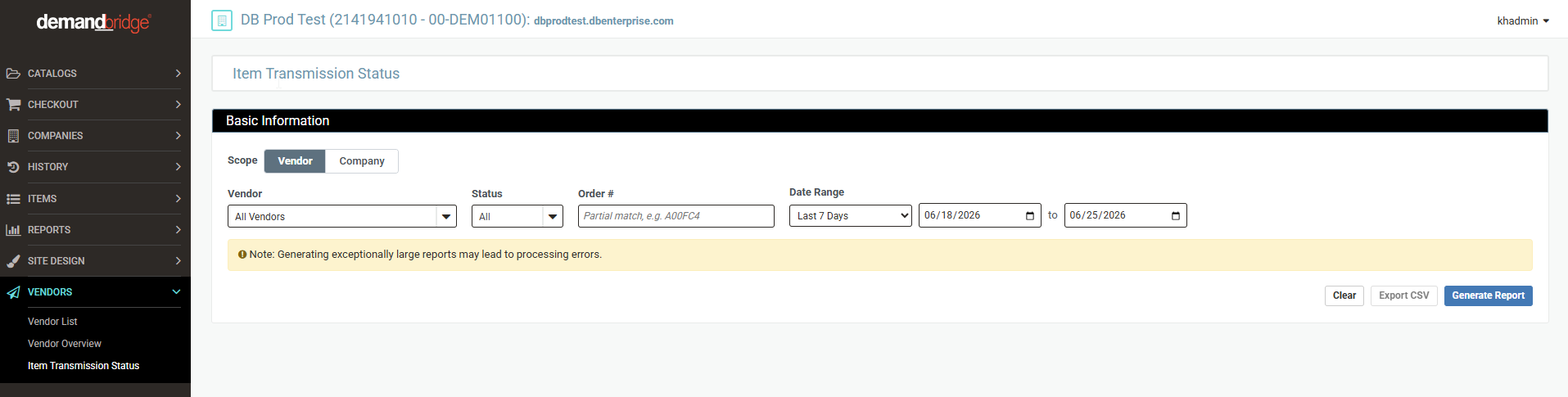
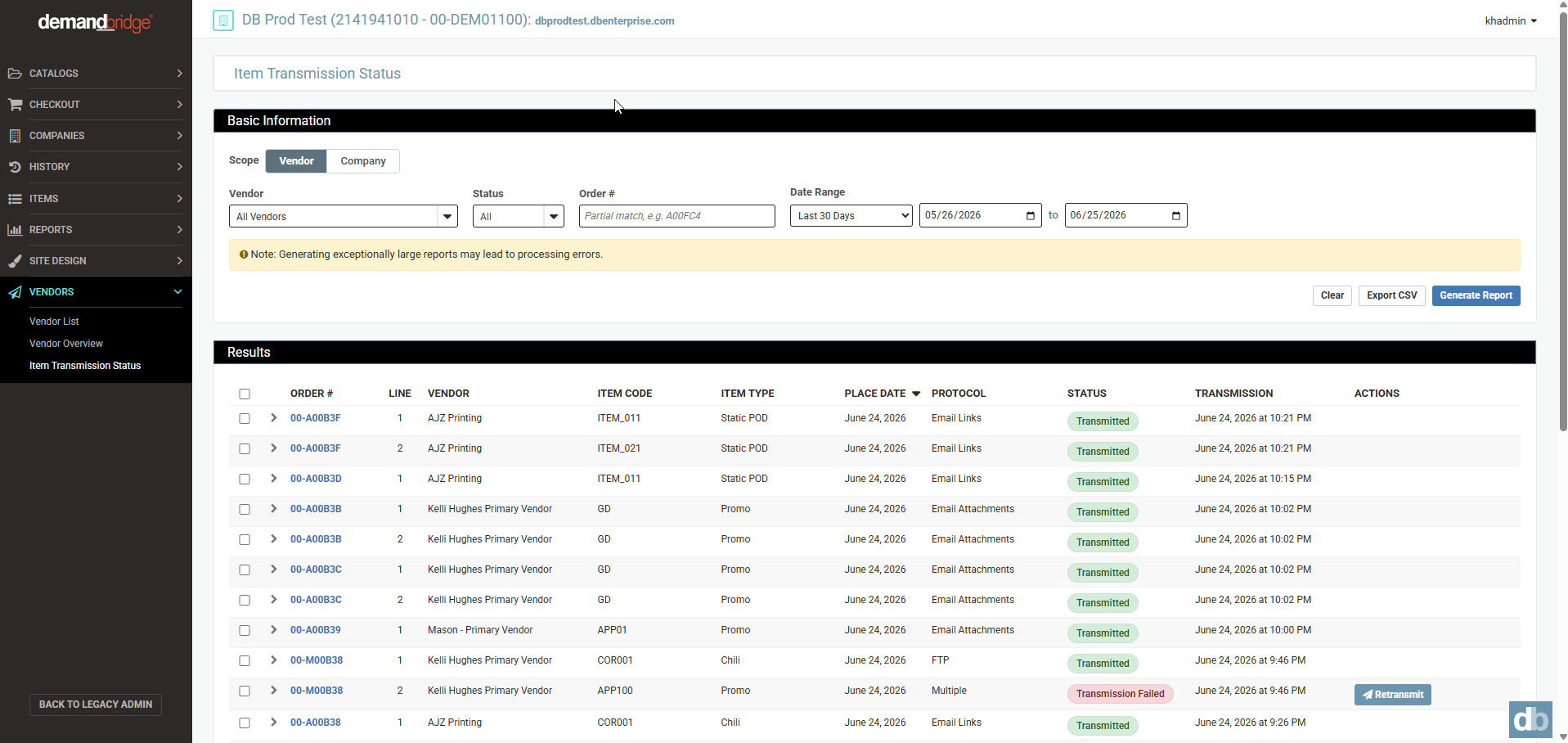
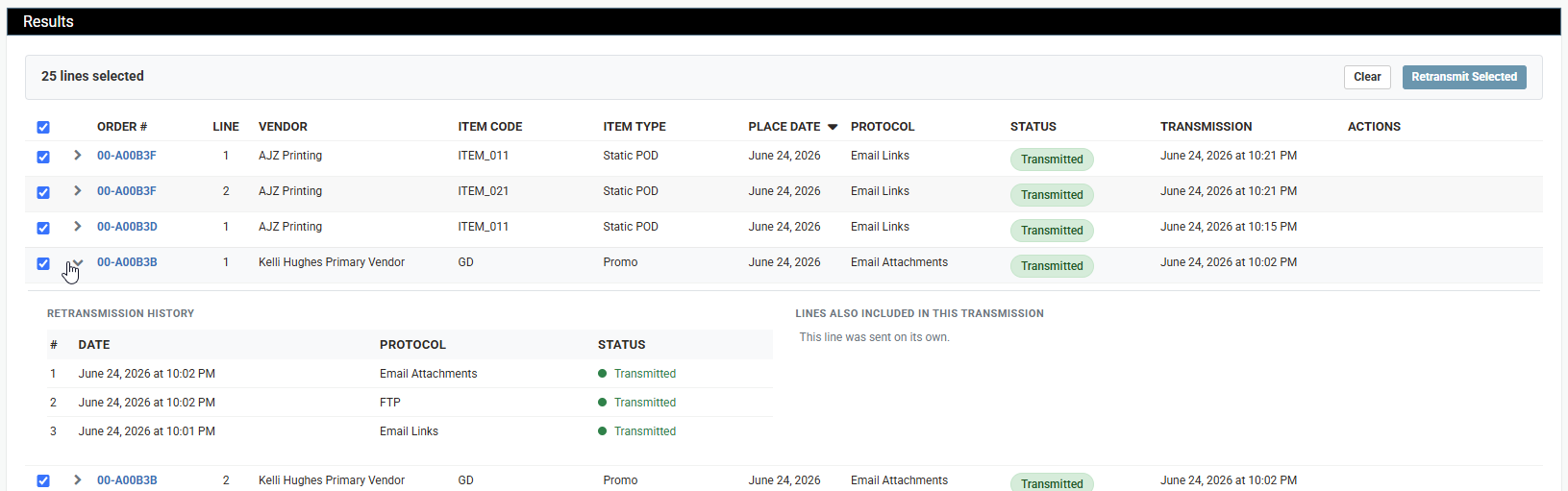
A new Item Transmission Status report is now available in the Distributor Admin under Vendors, giving admins full visibility into the transmission status of order line items sent to vendors all in one place. Filter by vendor or company, status (Success, Pending, or Failed), order number, and date range going back up to two years. Once your filters are set, click Generate Report to load results. Note that Generate Report must be clicked each time filters are adjusted to refresh the data.
Results display each order line's transmission protocol, status, and date, and can be expanded to view full retransmission history. Failed lines can be retransmitted directly from the report either with or without re-rendering the document eliminating the need to dig through individual order records. Results can also be exported to CSV for further review.
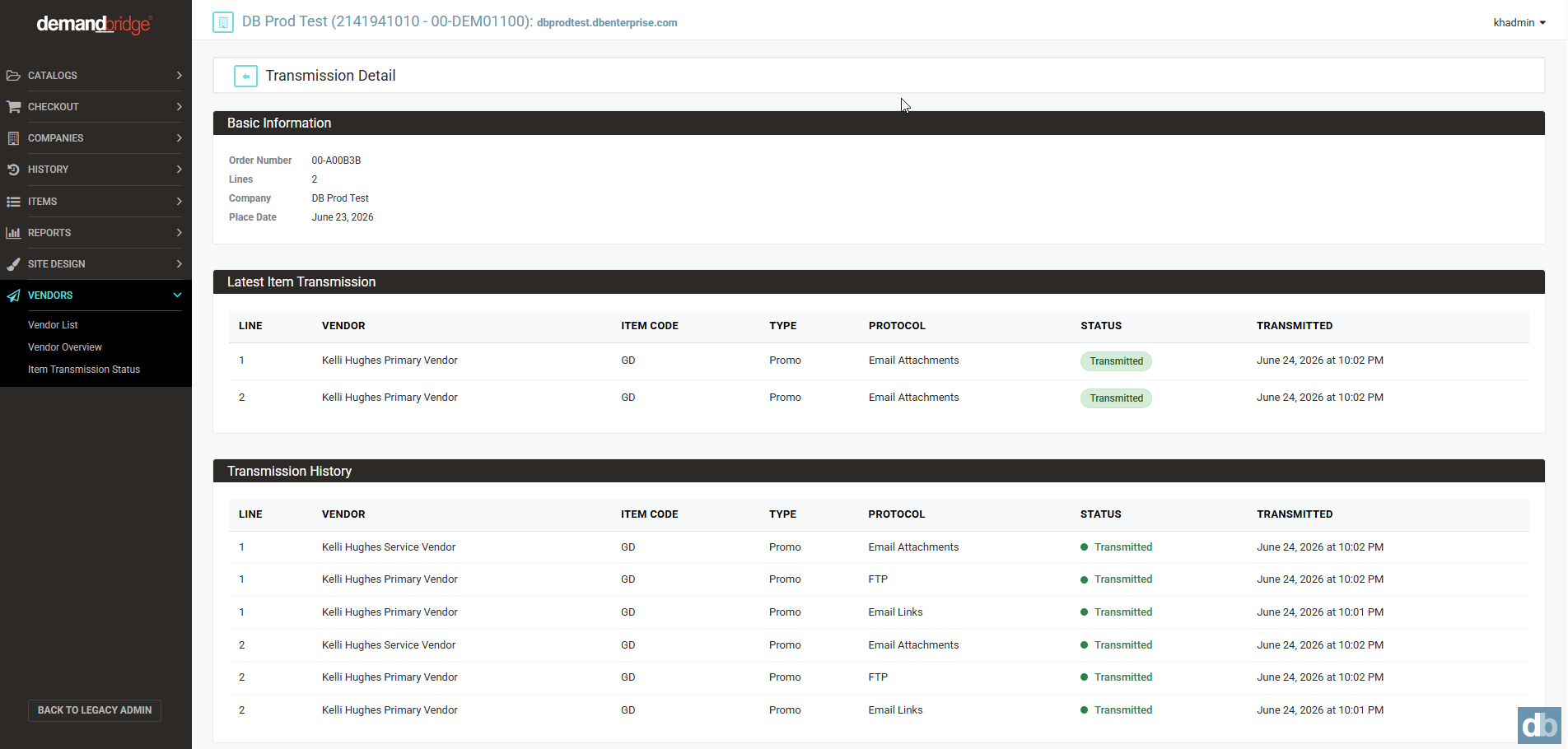
The Vendor Transmission detail page has been updated to serve as a drill-down companion to this report, accessible by clicking any order number within the results. Please note that the previous version of this report in the Legacy Admin has been deprecated.
-
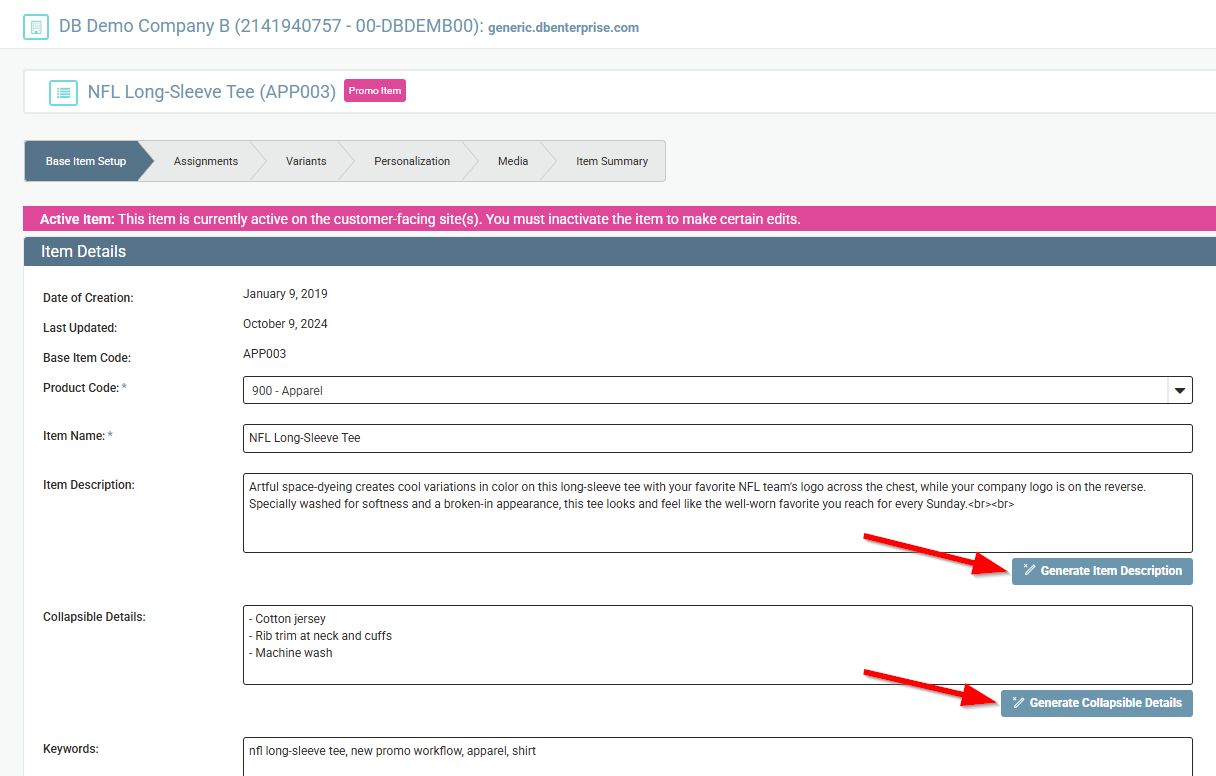
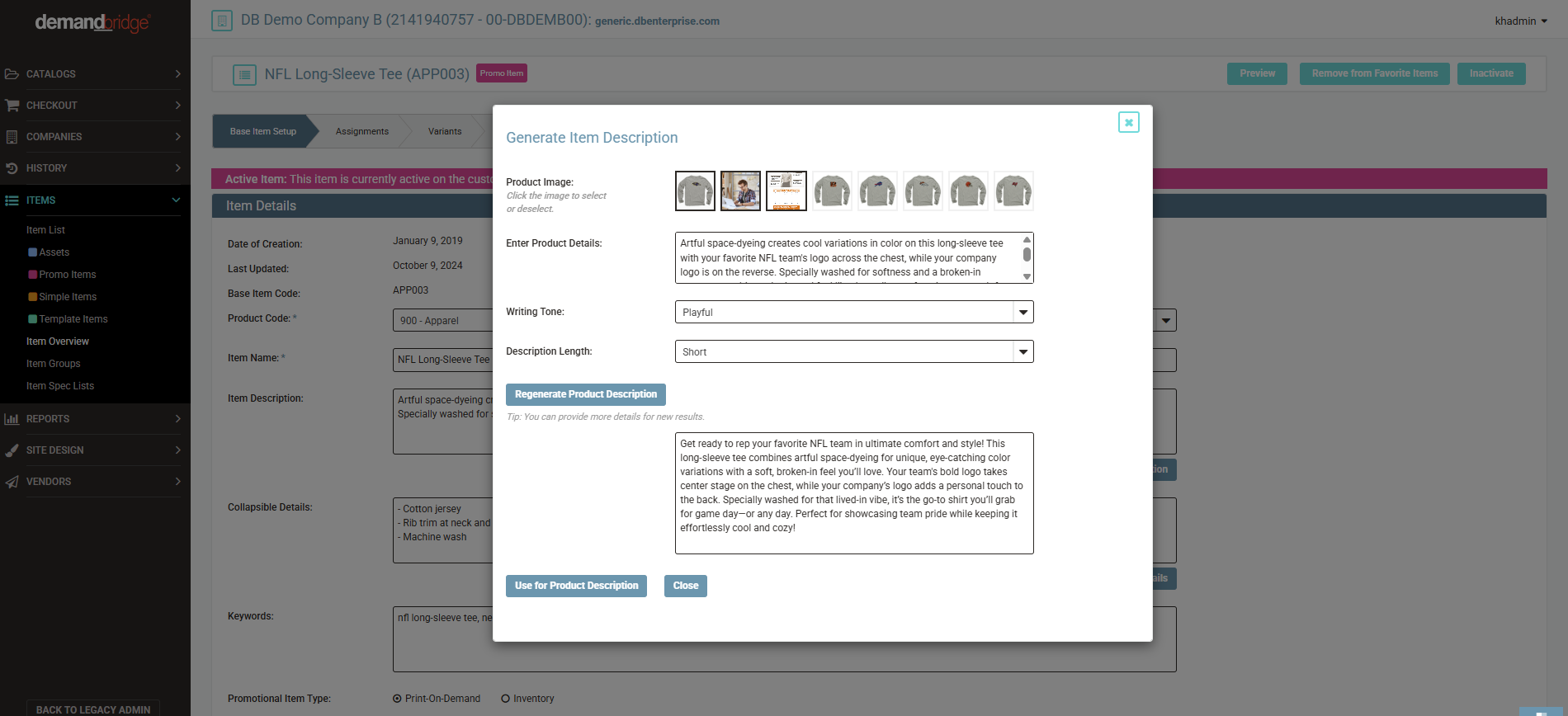
Admins can now generate professional product descriptions directly from the item setup screen. When creating or editing a Simple, Templated, or Promo item, click the new "Generate Item Description" button to open the AI description generator. From there, the system will preselect up to three product images as visual context (which admins can override as desired). Enter any additional details you'd like the tool to consider, or if there's already an existing description on the item, the system will use that as a starting point to generate updated content. Choose a writing tone (Formal, Friendly, Casual, Professional, or Playful) and a description length (Short, Medium, or Long). The tool will generate ready-to-use copy that you can review, edit, and apply with a single click or regenerate as many times as needed. This same capability is available for the Collapsible Details field as well.
-
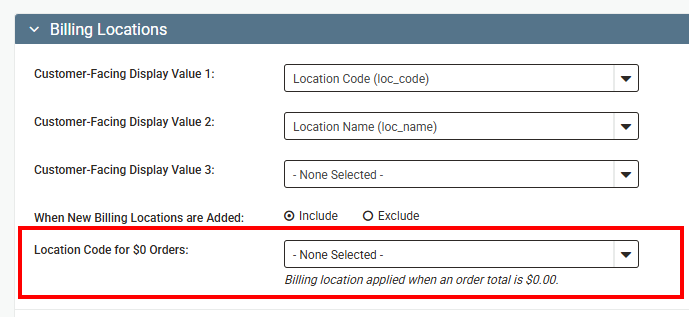
In the "Locations" section of new Dist Admin, there is a new field called "Location Code for $0 Orders". If a location code is selected here, it will only show at checkout if the order total is $0.00. This is intended to be used on orders when credit card is the only payment method offered to a company/group, but they need a non credit card option for $0.00 orders. FREE and ZERO are options that are commonly created within the ERP for this.
RESOLVED BUGS
- An issue has been resolved where selecting an Add-On Service in the Item Assignments tab would fail to show a checkmark and produce an error in the background, making it appear as though the action had not been saved. The checkmark now displays correctly upon selection, confirming the service was assigned successfully.
- A fix has been applied where promo items with a single variant (where "Include Options in Item Creation" was not enabled) would fail to display variant-specific images within the Responsive Interface, even though those images displayed correctly in Legacy. The Responsive storefront now handles image tagging for these items consistently with Legacy behavior.
- The Montserrat font has been removed from the Site Design font options due to rendering inconsistencies that caused text to display incorrectly on certain areas of the storefront. Any sites previously using Montserrat have been automatically updated to use Roboto, which is also confirmed as the default font applied to all new sites.
Sprint: R26-8 | Release Date: 6.3.2026
IMPROVEMENTS
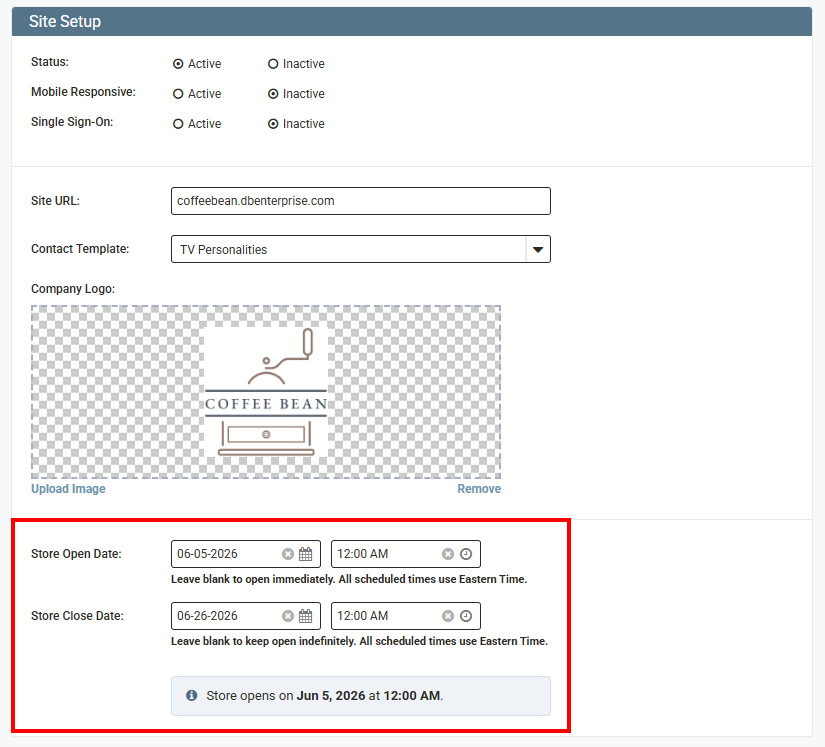
Administrators can now configure a Store Open Date and Store Close Date directly within the Company Overview → Site Setup section. This feature is avaible for both traditional Responsive Storefronts as well as Retail Storefronts. Each field includes a date picker, time picker with AM/PM toggle, and a clear button. When both dates are set, a live status indicator shows whether the store is currently open and when it will close.
On the customer-facing side, the platform automatically displays contextual messaging based on the configured dates:
- Before the open date: a full-page "Opening Soon" overlay modal is shown with the launch date.
- Within 3 days of the close date: a countdown banner appears across the top of the store (e.g., "Store closes in 2 days").
- After the close date: a full-page "Store Closed" overlay modal is shown with a thank-you message.
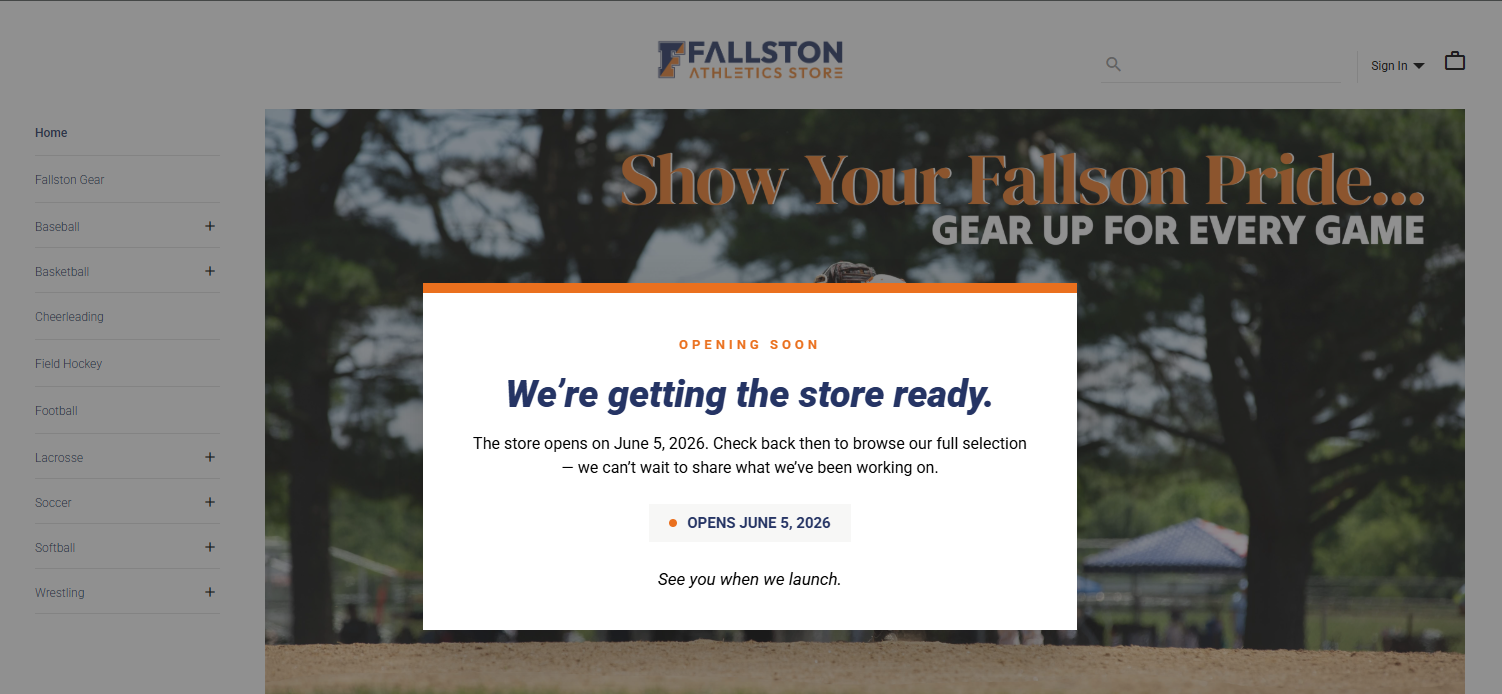
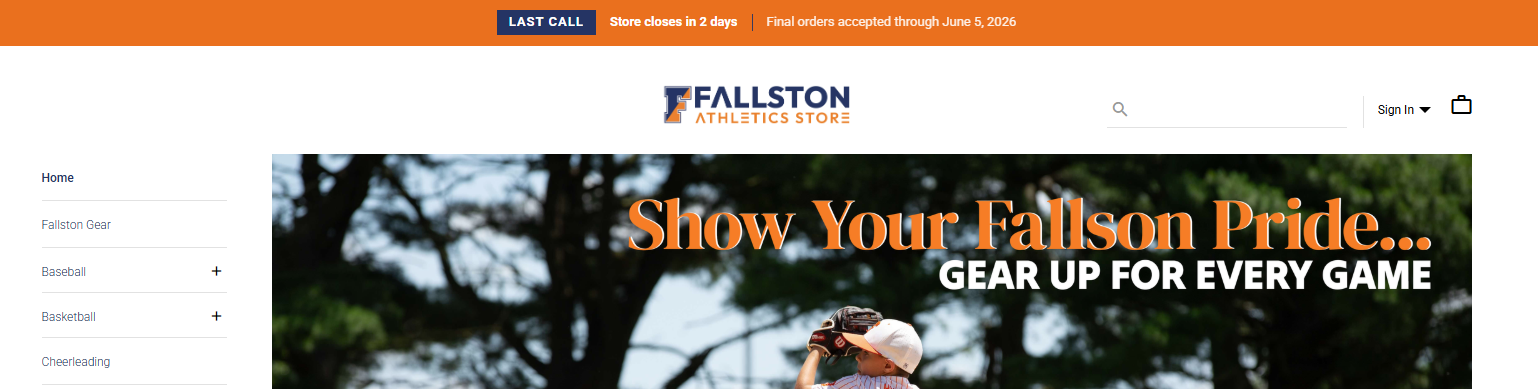
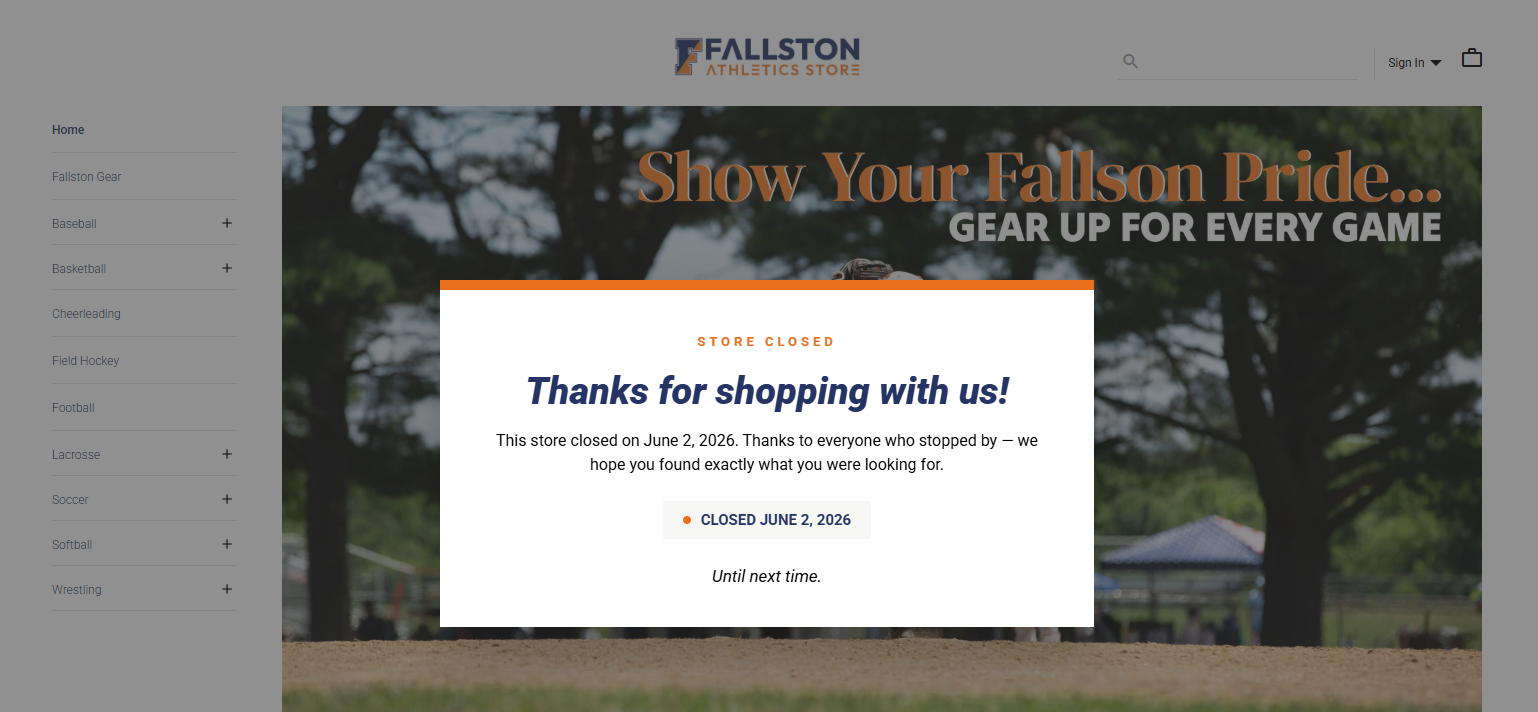
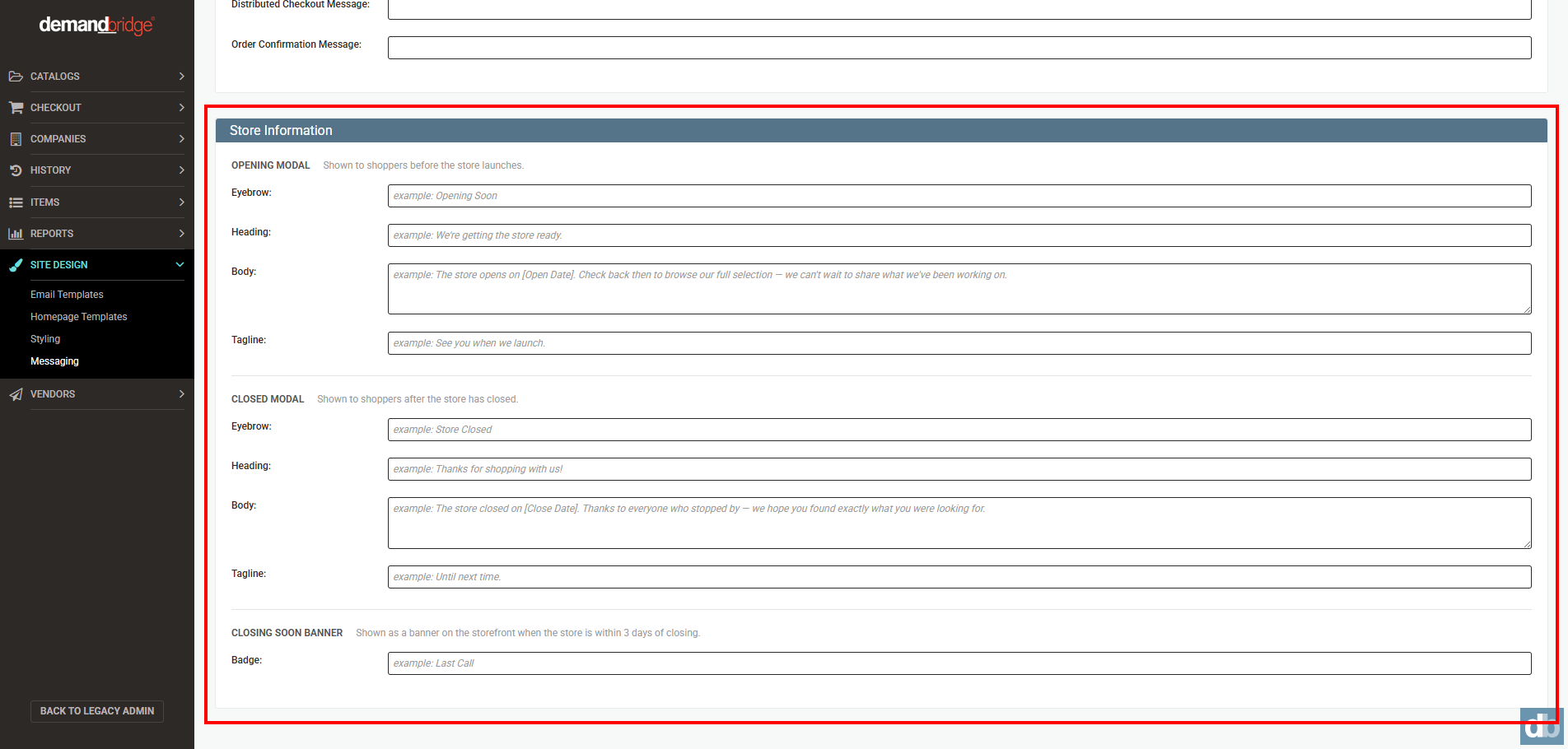
All modal and banner copy has configurable defaults and can be customized by admins under Checkout Screens > Store Information. Colors are driven by the site's primary and secondary brand palette.
Stay tuned — additional features such as store copying and order collection are on the way!
RESOLVED BUGS
- Resolved an issue in the Responsive Interface where handling charges were being shown in Account History when they should not have been. Order history now correctly reflects only the appropriate charge details.
- Fixed an issue in the Responsive Interface where users were not seeing an error message when their order exceeded their spending account limit. Users will now receive a clear notification when their billed amount exceeds their spending account limit.
Sprint: R26-7 | Release Date: 5.13.2026
IMPROVEMENTS
-
MY IMAGES MIGRATED TO CHILI PUBLISHER STORAGE
User-uploaded images ("My Images") have been migrated to a more reliable, centralized home. Previously, these images were stored in an older system that had known reliability issues — including bugs affecting image uploads, thumbnail generation, and disk usage in certain environments. With this change, My Images will be stored directly in Chili Publisher, the same platform already used to manage distributor assets. This resolves the underlying stability issues and removes a layer of complexity that required special workarounds across multiple services.
For end users, the feature works the same way. Due to the migration, the first time a user accesses their My Images they may experience a few extra seconds of load time — after that initial load, performance should return to normal. Users will continue to deactivate images within legacy as they do today, and similar functionality will be introduced in the responsive interface in a future release.
- When processing credit card transactions through DBPay, the system will now include Level 3 data — detailed line-item information such as amount per item, product title, item id and quantity. Passing this additional data can qualify transactions for lower interchange rates, which may reduce processing costs for eligible corporate and purchasing card payments. No changes are required from end users — this data is captured and transmitted automatically as part of the checkout process.
-
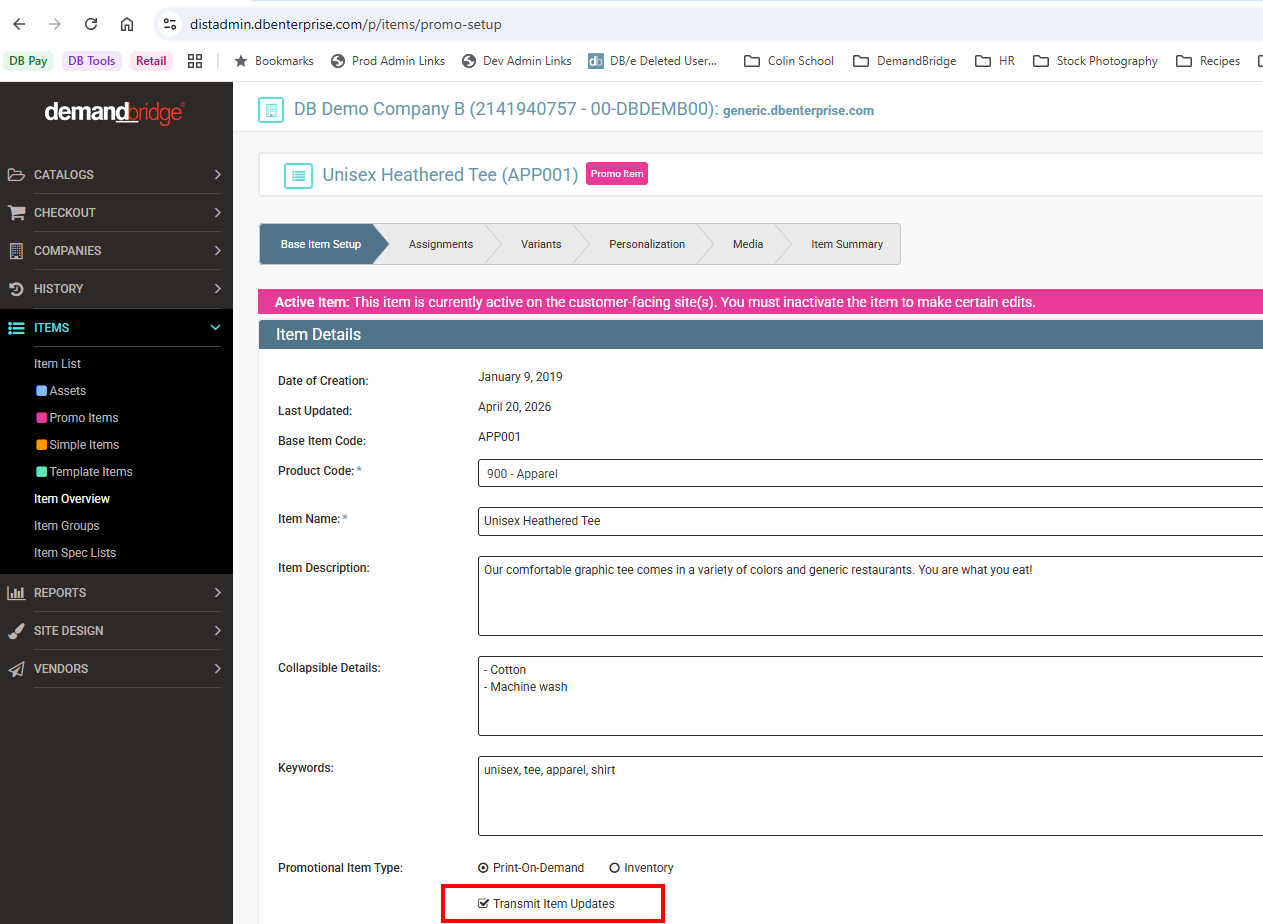
Customers using DB/d as their backoffice will see a new option in the Promo Item setup: "Transmit Item Updates." This setting is enabled by default. When checked, item data specified in DB Commerce will be transmitted and used to update the corresponding backoffice item record. When unchecked, that data will not be transmitted and the backoffice record will remain unchanged. For new items or existing item codes not yet flagged as promo items, an item creation or update request will be sent regardless of this setting, and the backoffice record will be created or updated accordingly.
- Improvements have been made to reduce long load times on Personalized Promo Items. Changes were made to streamline how personalization options are loaded, resulting in improved page performance.
RESOLVED BUGS
- When deactivating an item alert, emails were continuing to send as if the alert were still active. The only way to stop the emails was to delete the alert entirely. This has been resolved and deactivating an item alert will now immediately prevent further emails from being sent, without requiring the alert to be deleted.
- When updating multiple delievery options at once under Work With Groups > Freight Information, changes were only saving for the selected row and the system would revert all other selections back to their original state after clicking Save Changes. This has been resolved. Updating the Operation column to Revoke for one or more freight options will now persist correctly after saving, regardless of how many options are changed at once.
- Within the Responsive Interface, pricing was incorrectly displayed on the item detail page even when the site-level "Show Pricing" permission was set to Deny. The item detail page now correctly hides pricing in this state, consistent with behavior at the catalog level, and continuing to show $0.00 though the checkout process.
- When an admin configures a customer-facing display value for a location, that value was not being shown on the responsive order history page. Instead, the page was defaulting to the internal code and description regardless of what had been configured. The order history page will now display the admin-configured label when one has been set. If no custom display value is configured, the page will continue to fall back to the existing behavior.
- Credit card orders containing linked items were incorrectly displaying two credit card lines on the order confirmation, one for the correct total and a second showing $0.00. In some cases this also caused the order to be incorrectly flagged as split billing and routed to manual entry. This has been resolved as orders with linked items will now show a single credit card line reflecting the full purchase amount, and will no longer be incorrectly treated as split billing orders.
Sprint: R26-6 | Release Date: 4.22.2026
RESOLVED BUGS
- Within the Approval Center when adding an item to an existing credit card order, the billing information was not being correctly duplicated across all line items. This caused the system to incorrectly interpret the order as a split billing scenario, which caused the Add Item button to disappear. This has been corrected — billing information is now properly carried over when new items are added to a credit card order and the Add Item button remains present.
- When multiple billing options were used on an order, not all of them were appearing in the Approval Center, causing funds to be applied to the incorrect billing option. This has been corrected — all billing options associated with an order will now display properly in the Approval Center.
- Within the Responsive Interface, on smaller screens such as laptops, the image upload box could become hidden and unreachable when a large number of images were added to a customized item. Users were unable to scroll far enough to access the upload box. This has been corrected — the upload box now remains visible and accessible regardless of how many images are added or what screen size is being used.
- Within the Responsive Interface, unformatted system text was incorrectly appearing alongside the Min/Max Order Quantity label on promotional items. This has been corrected — only the intended minimum and maximum order quantity information will now display on the label.
- The cXML ordering process has been updated to use the e-mail xpath feature in order to correctly identify the user e-mail address on incoming orders.
Sprint: R26-5 | Release Date: 3.25.2026
IMPROVEMENTS
- Administrators were unable to directly access SSO-enabled sites in the Responsive interface due to the enforced SSO login flow. This has been enhanced to allow administrators to impersonate users and bypass the standard SSO process, enabling direct login for site management—similar to the functionality previously available in the Legacy interface.
- The Punchout catalog type has been enhanced to support both a Shopping URL and an Order URL, providing greater flexibility in configuring catalog integrations.
- Within the Responsive Interface, Company Profile Group lists exceeding 100 values now require a minimum three-character search input to display results. This update enables faster and more efficient searching with reduced delays.
- User email addresses were not displayed in the New Distributor Admin and New Customer Admin Order History areas. This has been updated to ensure that user email addresses are now visible, with support for clickable email links when available.
- Fonts selected under Site Design > Styling were not consistently applied across all areas of the Responsive interface, particularly in newly added sections. This has been resolved to ensure that the selected fonts are now applied consistently throughout all areas of the interface.
RESOLVED BUGS
- Updates have been made to the Punchout catalog process to ensure that the item unit of measure (UOM) returned from the Punchout partner is accurately recorded.
- Within the Responsive Interface, a display issue has been resolved to ensure that the Profile Name dropdown and associated action buttons (Add, Duplicate, Delete) are fully visible and consistently rendered across all customizable items.
Sprint: R26-4 | Release Date: 3.11.2026
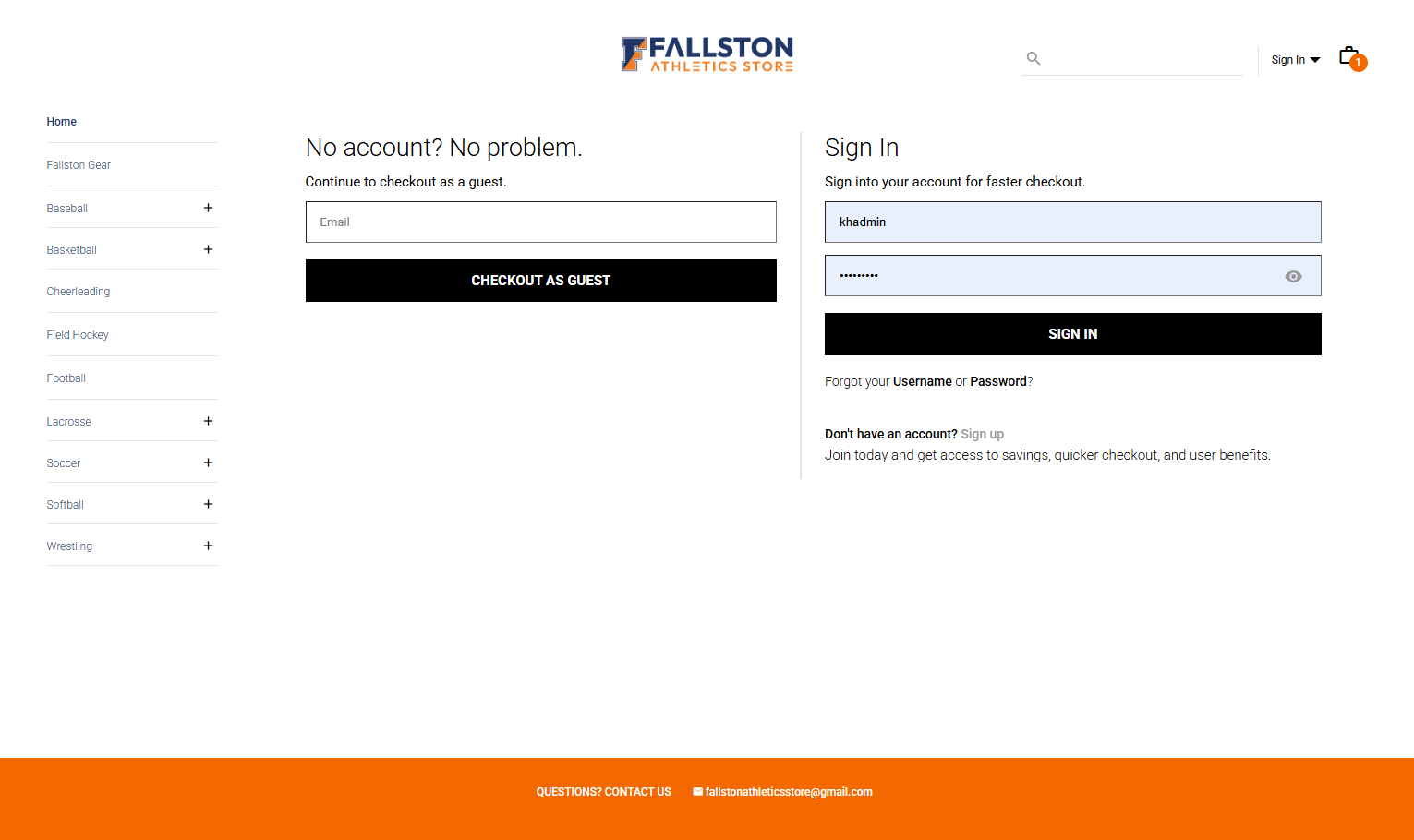
Introducing Retail for Your Storefront
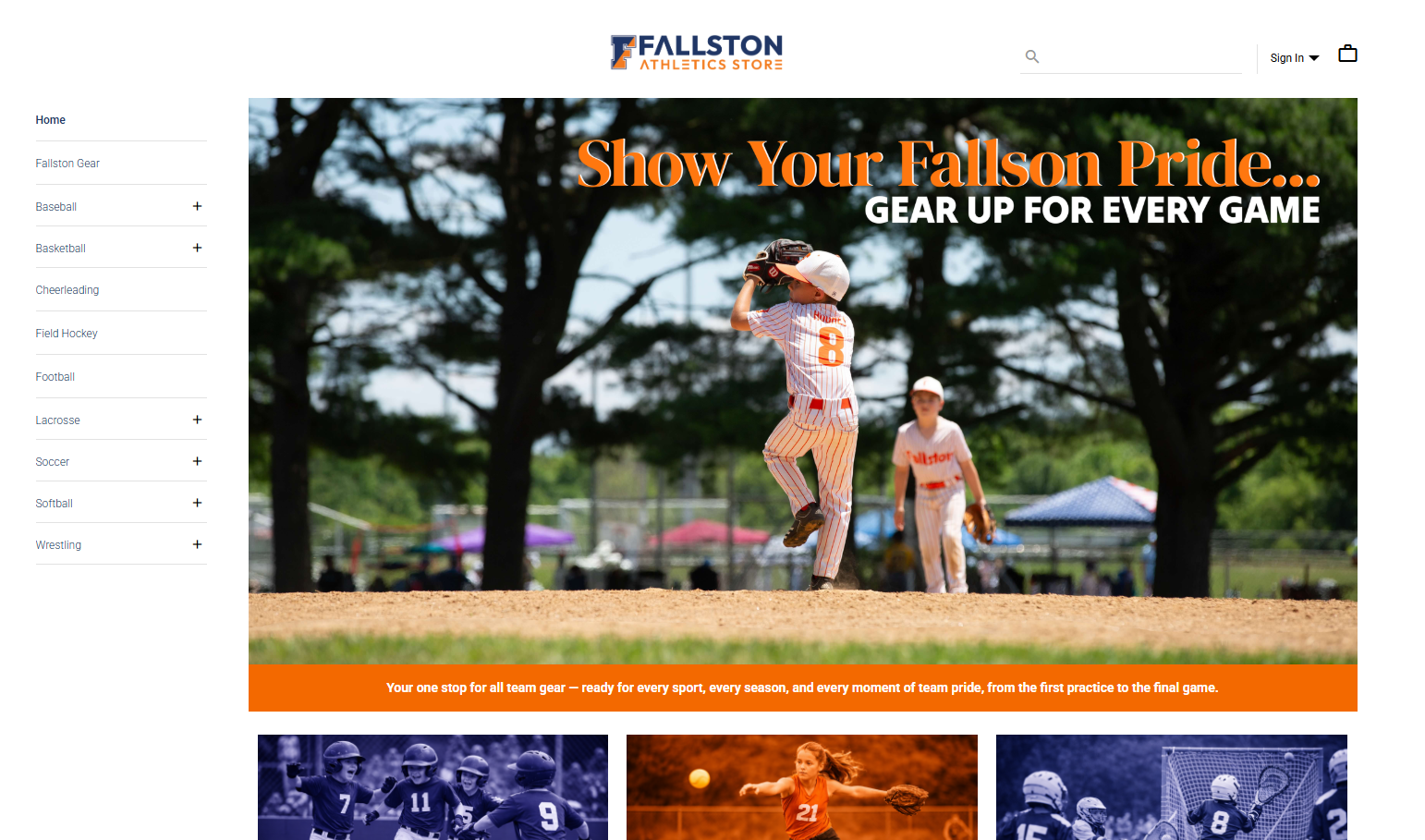
Retail Storefront Access, a new feature that allows visitors to browse your storefront without requiring a login. This enhancement creates a more open and flexible shopping experience by enabling users to explore products, view catalogs, and build their carts before deciding how they would like to check out.
At checkout, shoppers can choose to create an account or continue as a guest, making it easier for new customers to complete purchases without needing to register first. This feature is designed to support more traditional retail-style shopping while still allowing organizations to capture customer information when appropriate.
If you’re interested in participating in beta testing, please reach out to Kelli Hughes, khughes@demandbridge.com for more information.
IMPROVEMENTS
- Updates have been put in place to ensure vendor file naming is consistent between the physical files and the XML tags.
- The maximum file size for Vendor Attachments in New Distribution Admin has been increased from 30MB to 100MB, allowing larger files to be uploaded and shared with vendors.
- Within the Responsive Interface, added a Distributor-Level Login Message, allowing administrators to display login communications that apply across all companies under a distributor. A new Login Communication field is now available at the distributor level, while existing company-level login messaging remains unchanged and continues to function as before. This is located under Site Design > Messaging > Distributor Tab.
- Expanded font customization options, allowing administrators to select from additional fonts that support the standard font weights used throughout the application. Newly available fonts include Inter, Manrope, Work Sans, Sora, Noto Sans, and Bricolage Grotesque, providing greater design flexibility while maintaining visual consistency.
- Standardized the display size of the Company Logo in the Responsive Customer Admin > Company Overview area and on the Customer Admin Login page. The logo is now proportionally sized, preventing oversized logos from occupying excessive space.
RESOLVED BUGS
- For items using EQ or QB pricing, the Unit Cost field will now reference the appropriate cost break when sending order information to the vendor (when Show Cost is enabled for the vendor). This ensures the correct cost value is included based on the applicable pricing tier.
- Resolved an issue in the Responsive Customer Admin where orders updated to Shipped would still appear as Submitted in the Orders table view. The order status will now display consistently as Shipped in both the Orders table and the individual order details page.
Sprint: R26-3 | Release Date: 2.18.2026
IMPROVEMENTS
-
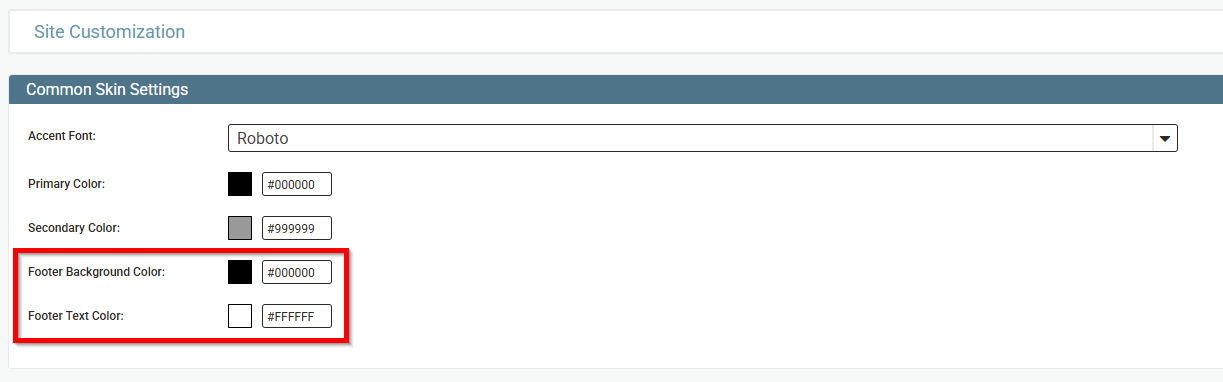
As we continue to expand and simplify site customization within the Responsive Interface, administrators can now further personalize their ecommerce storefront by configuring a dedicated Footer color. This enhancement is available within the existing Site Design > Styling admin interface and follows the same behavior and logic as the current Primary and Secondary color settings, ensuring a consistent and intuitive configuration experience.
-
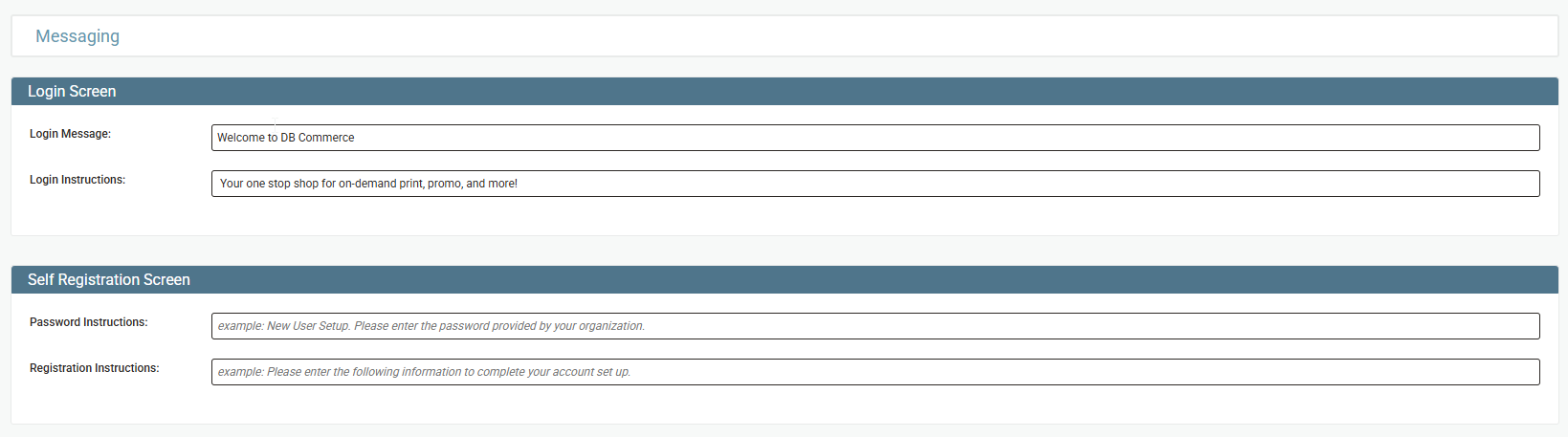
Administrators can now customize the instructional text displayed throughout the Self Registration flow within the Responsive Interface. Custom messaging can be configured for both the password entry step and the account registration step, allowing tailored guidance for users. When configured, this messaging will override the default site instructions.
This setting is located under Site Design > Messaging.
- Updated order tax logic to ensure that when an order contains tax-exempt line items, associated freight charges are also correctly recognized as tax exempt.
RESOLVED BUGS
- Resolved an issue in Responsive Checkout where freight and tax were not calculating for zero-dollar carts. Freight and tax now calculate correctly regardless of cart total.
-
Updated logic in Responsive Interface where Category Tabs with long labels or large quantities would stack vertically instead of displaying in a horizontal scroll/overflow format. This caused tabs to extend beyond their container and overlap the item variable section.
Category Tabs now cascade horizontally with proper overflow navigation, remaining contained within their designated area and no longer overlapping page content.
- Corrected an issue where saved credit cards processed through Authorize.Net were not displaying in the Responsive Interface - Account > Billing section. Customers can now view, edit, and delete their stored credit cards as expected from the Account area.
- Addressed an issue in Distributor Admin where attempting to assign a group to a user without an existing group resulted in a “Failure to save data” error message. Administrators can now successfully assign and save group changes without encountering errors.
Sprint: R26-2 | Release Date: 1.28.2026
IMPROVEMENTS
-
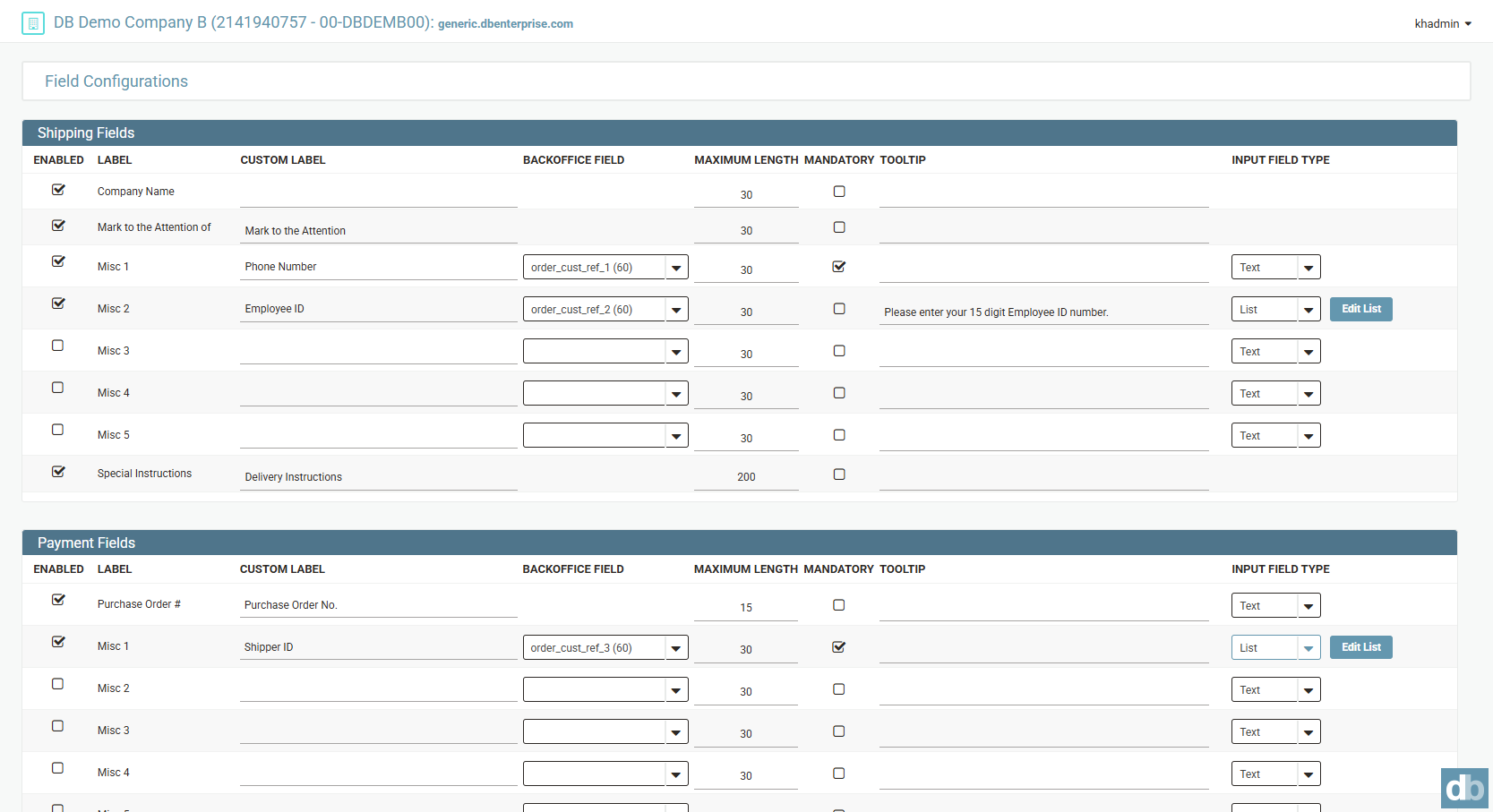
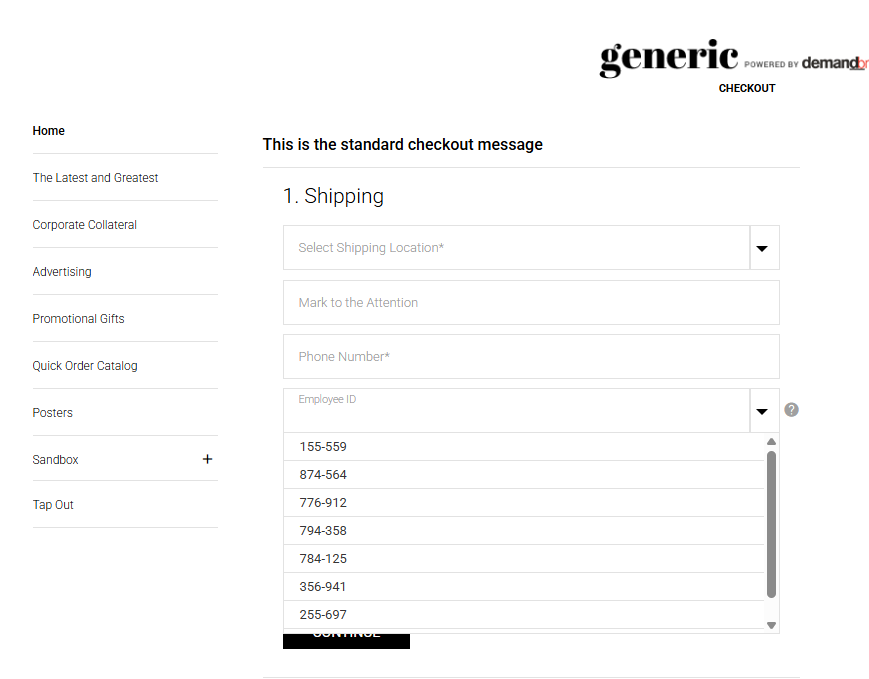
The DB Commerce checkout experience has been enhanced to support list selections for shipping and billing fields in addition to text input. Administrators can now define predefined options for these fields, improving data consistency, reducing entry errors, and streamlining the checkout process for end users.
- Enhancements have been made to the vendor XML processing workflow to improve overall reliability and performance, helping ensure smoother and more consistent file handling.
- Improved how addresses are displayed across DB Commerce to make them clearer and more consistent. Wherever an address appears in customer-facing screens or emails, the full country name will now be shown (when available). The country will appear after the postal code and will reflect either the preset location or the country selected during checkout.
RESOLVED BUGS
- An issue was resolved where deleting a user profile removed it from the profile dropdown but left the previously selected profile values visible. Now, when a user profile is deleted, the profile list resets to Select Profile, and all associated fields clear and return to their default values.
Sprint: R26-1 | Release Date: 1.7.2026
IMPROVEMENTS
-
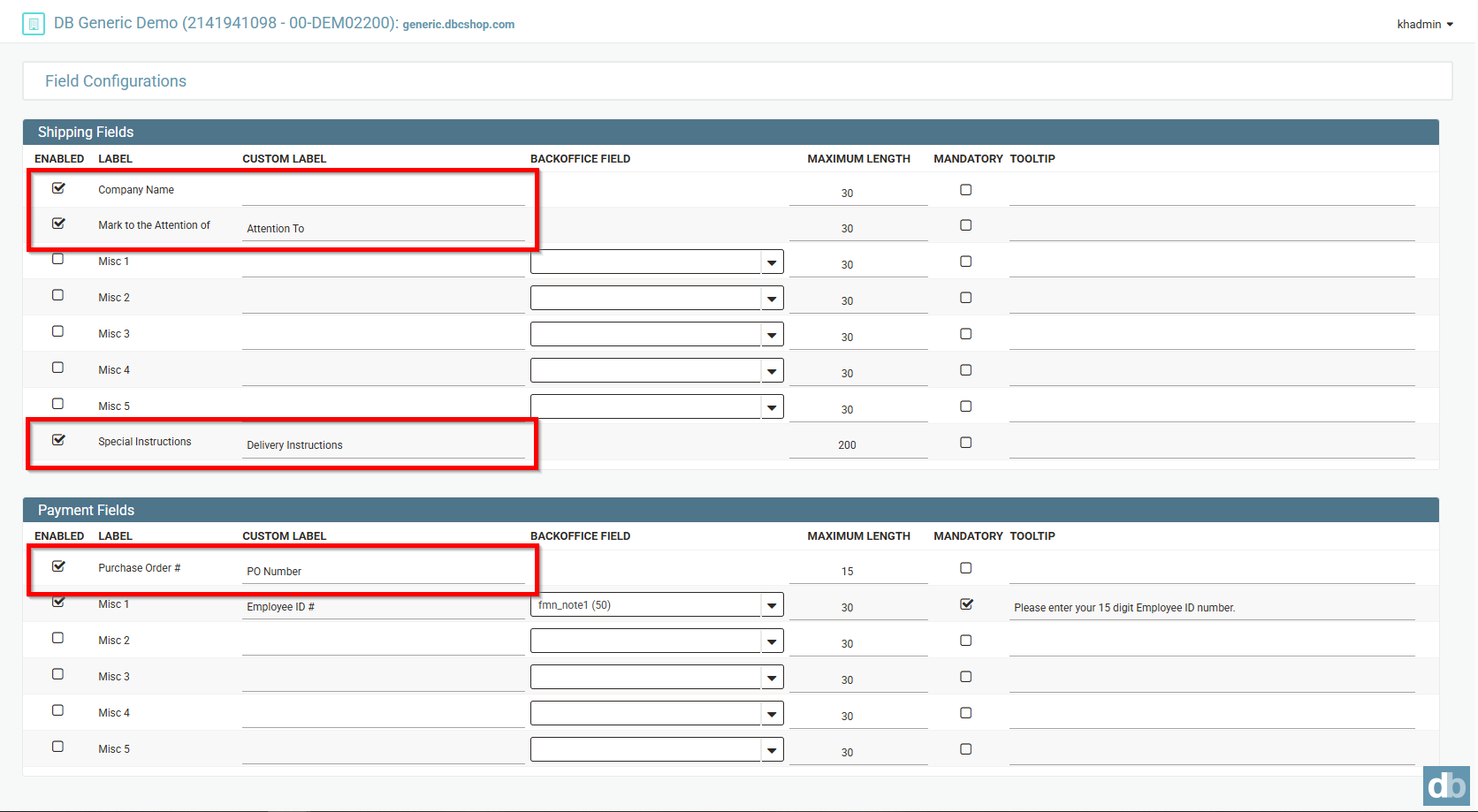
Within the New Distributor Admin, field configuration options have been relaxed to provide greater flexibility for responsive sites. The following fields can now be disabled and assigned custom labels, while continuing to support existing functionality such as Maximum Length, Mandatory, and Tooltip settings:
- Company Name
- Mark to the Attention of
- Special Instructions
- Purchase Order #
These updates follow the same behavior currently supported by Misc Fields, ensuring visual consistency and a familiar configuration experience within the admin. This enhancement provides greater consistency, flexibility, and control as customers continue transitioning to the responsive interface.
At this time, customer input for these fields supports text entry only. Support for dropdown configurations will be introduced in a future update.
-
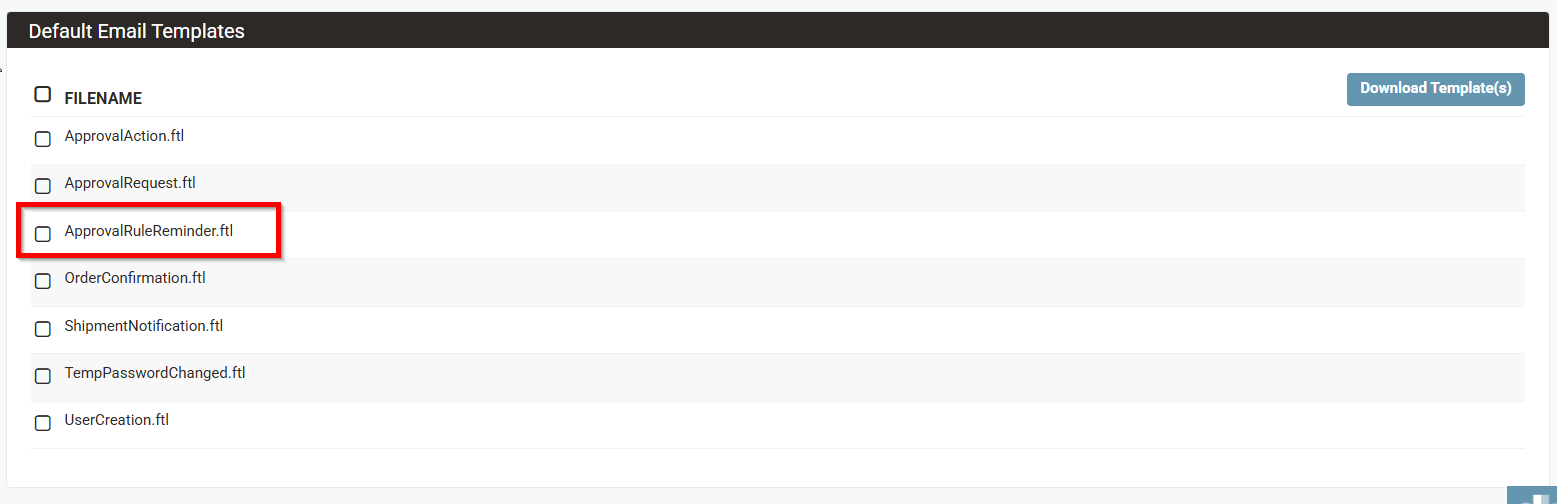
The New Distributor Admin now supports uploading and managing a custom Approval Reminder email template within Site Design > Email Templates. This enhancement allows administrators—particularly those using SSO or Punchout—to update URLs and tailor the Approval Reminder email to better align with their workflow and authentication requirements.
RESOLVED BUGS
- An issue was resolved where Chili fields with a prefix could display overlapping label and prefix text when the field was left blank and focus moved to another variable. The field now maintains the correct layout and appearance, matching its initial state when the document loads.
- A correction has been made so that international shipping works fine with the "show all freight rates at checkout" option when the "real freight" option is also enabled.