
DBD: Lot Inventory Status Report
The Lot Inventory Status Report provides an inventory valuation for physical goods stored across distributor warehouse locations. It is uniquely structured to isolate individual supply batches, reporting two distinct lines of data per lot: one row dedicated to transaction tracking quantities and a matching row detailing extended financial values.
Key Features
- Granular Lot Detail: Differs from the standard Inventory Status Report by allowing users to toggle an option to view comprehensive Lot Detail filtered explicitly by Job Number.
- Dual-Line Balance Reporting: Each unique lot outputs two parallel lines of data—one showing volume unit flows and the other calculating monetary value.
- Flexible Price Modeling: Evaluates the extended value of inventory assets using either the standard catalog sell price or a set catalog (IMS) price configuration.
Navigate to: DB Distributor > Print Management > Reports > Items > Lot Inventory Status Report
Available Sequences
When generating the evaluation, the data is organized using the following sequence option:
- By Customer / Location / Purchase Order Number
Understanding the Report Output
The report splits inventory movement tracking chronologically across distinct warehouse transactional behaviors:
| Column Header | Description |
| Item Code & Description | The unique catalog item identifier code and its system description string. |
| Job Number | The distinct production plant job number or lot ID assigned to that specific batch of stock. |
| Distr Owned | Identifies whether the financial ownership of the specific lot belongs to the distributor rather than the client. |
| Beginning Inventory | The starting physical balance of the lot at the opening boundary of the reporting window. |
| Receipts | Total new product quantities officially checked into the warehouse for that specific lot profile. |
| Issues | The volume of inventory fulfilled, shipped, or pulled from the lot during the active cycle. |
| Adjust. | Any manual inventory corrections or adjustments made to the lot balance (e.g., damaged items or count overrides). |
| Ending Inventory | The final calculated physical balance remaining in storage at period close (Beginning + Receipts - Issues $\pm$ Adjust.). |
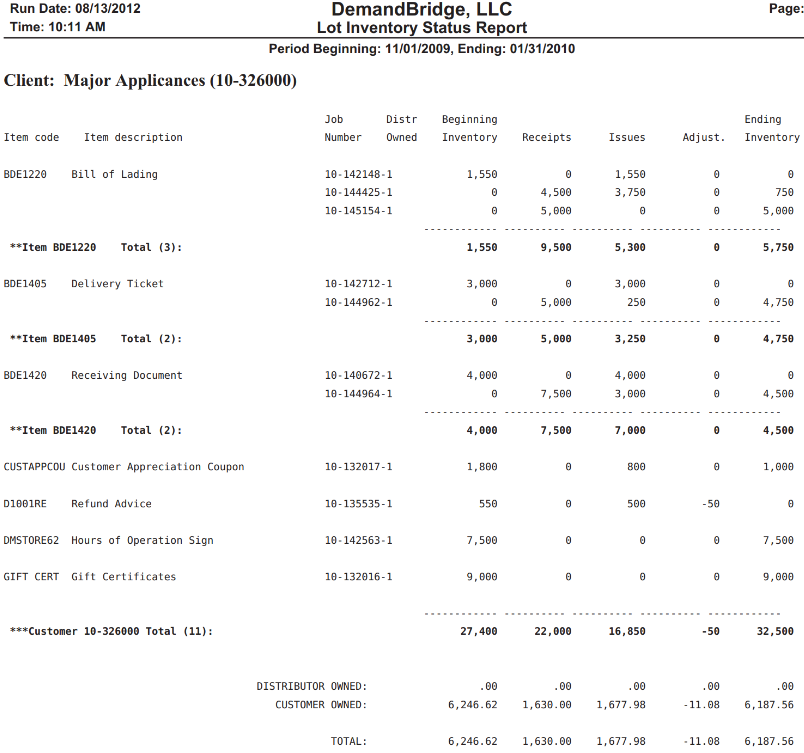
Summary Financial Breakouts
At the bottom of the customer section, the report aggregates the parallel valuation lines into clear structural tiers:
- Distributor Owned: Sum total value of items warehouse-managed but not yet owned by the client.
- Customer Owned: Sum total value of items explicitly pre-billed or owned by the client.
- Total: Combined physical asset valuation across all classifications.
💡 Tip: Tracking negative numbers in the Adjust. column helps call out specific lots experiencing shrinkage or damage adjustments during the cycle processing window.