
DBD: Warehouse Shipment Report
The Warehouse Shipment Report is an enhanced, modern version of the traditional Warehouse Release Report. While retaining all core transactional features of the original report, it offers advanced cross-referencing identifiers and data extraction features to optimize customer-facing delivery and automated workflows.
Key Features
- Electronic File Generation: Features a high-value option to export a standalone data file alongside the printed report layout, allowing for frictionless digital delivery directly to the customer.
- Expanded Catalog Identifiers: Promotes cleaner item matching by simultaneously displaying both the primary distributor item code and the customer's unique internal product code.
- Comprehensive Procurement Context: Includes clear configurations to pull and render customer-specific inventory counts and specific Customer Purchase Order numbers directly into the transaction lines.
Navigate to: DB Distributor > Print Management > Reports > Items > Warehouse Release Report 3.8
Available Sequences
When generating this log, the information is sorted using the following sequence option:
- By Customer / Location / Item
Understanding the Report Output
This report generates a dual-layered layout consisting of detailed item transactions followed by a high-level corporate summary sheet.
1. Item Detail View
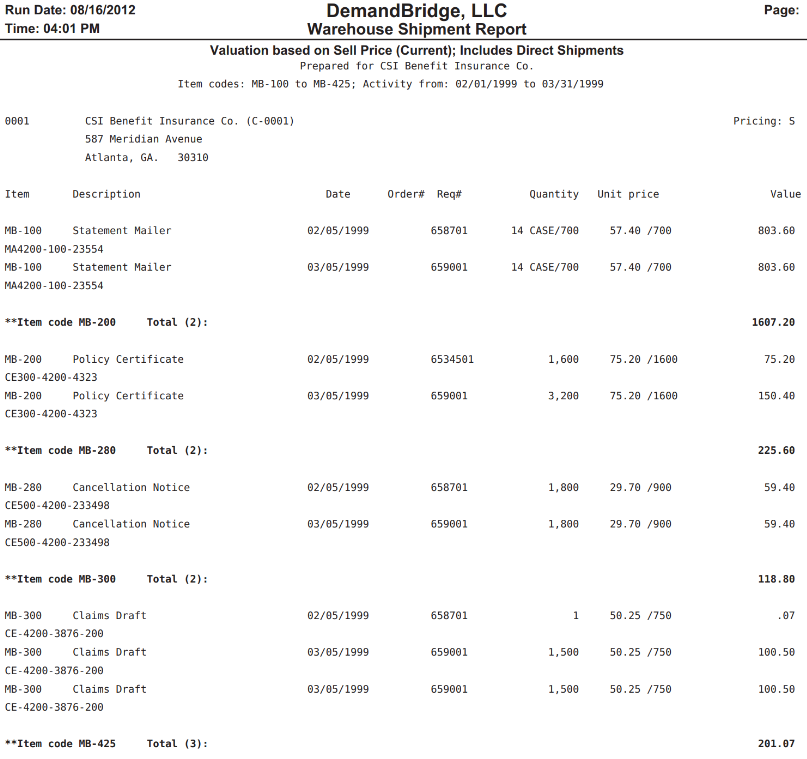
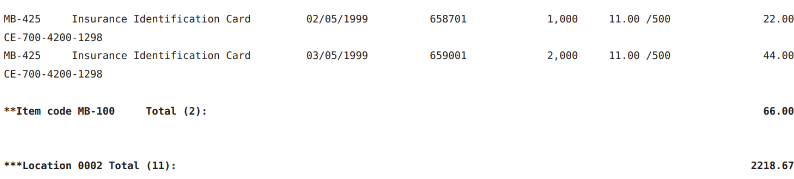
Transactions are cleanly categorized underneath distinct customer location address banners, with manufacturer tracking reference strings nested tightly beneath each parent item code row:
| Column Header | Description |
| Item | The unique catalog item identifier, with secondary internal part references (e.g., MA4200-100-23554 ) printed on the row beneath. |
| Description | The alphanumeric master catalog label or descriptive name identifying the item. |
| Date | The specific calendar date the shipment or fulfillment line was processed. |
| Order# / Req# | Tracks cross-reference order entry numbers alongside the specific source requisition document ID. |
| Quantity | The total volume of units fulfilled, including packaging scale rules when applicable (e.g., 14 CASE/700 ). |
| Unit price | The item's active unit value scale or unit cost metric (e.g., 57.40 /700 ). |
| Value | The financial calculation assigned to the shipment row based on active sell pricing rules. |
2. The Customer Recap Sheet View
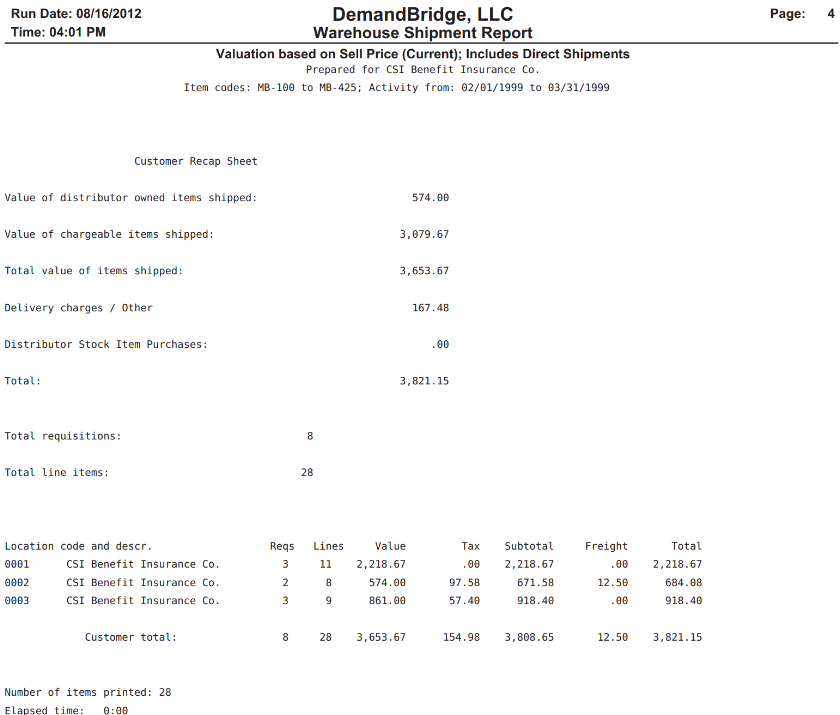
Printed at the end of the report run, this section aggregates all item detail lines into a high-level summary matrix, categorizing items by ownership status, miscellaneous surcharges, and location profiles:
| Financial Line / Header | Description |
| Distributor Owned Shipped | Total dollar value of shipped items that were technically warehouse-owned prior to the release event. |
| Chargeable Shipped | Total billable value of the inventory units shipped out during this window. |
| Delivery charges / Other | Miscellaneous adjustments, handling fees, or shipping surcharges applied to the cycle run. |
| Distributor Stock Item Purchases | Financial tracking line for direct distributor stock purchases made during the period. |
| Activity Counts | Quick auditing counters tracking the absolute number of Total Requisitions, Total Line Items, and total unique items printed. |
| Location Code Ledger | A cross-location grid breaking out Reqs , Lines , Value , Tax , Subtotal , Freight , and final combined Total balances per physical delivery location code. |
💡 Tip: If your client manages their inventory adjustments via external spreadsheets or an internal database, utilize the File Creation toggle during this report's setup. Providing them with the digital data file version completely eliminates the need for them to manually scrape text out of a standard PDF report.