
DBD: Order Processing - Enhanced Backorder Fill Report
DBD: Order Processing - Enhanced Backorder Fill Report
🔵 Overview The Enhanced Backorder Fill report provides an option to the Original Backorder Fill Report.
GUI: Order Processing, Purchase Orders, Processing, Enhanced B/Order Fill Rpt
CHUI: P/O, RQ - Enhanced Backorder Fill Report
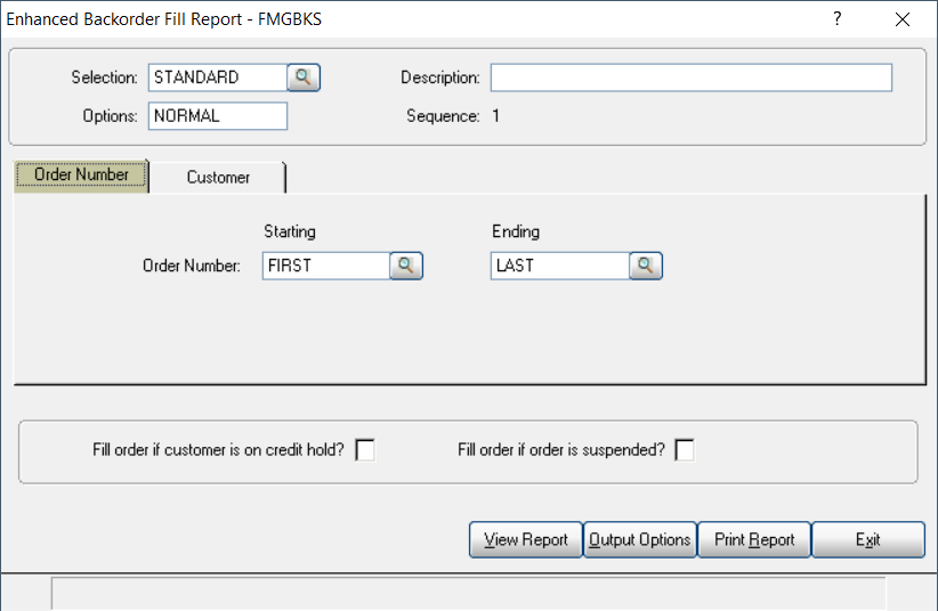
Enhanced Backorder Fill Report - FMGBKS
Selection Options
This report currently has 2 different Selection options:
- 1 - Order Number
- 2 - Customer / Order Number
This program will read the order file. If an order has a backordered line, the program will do one of the following:
How Backordered Lines Are Handled
- If the order is in the invoicing process, the order will be printed on the report with the message "In Invoicing". A packing slip will not print.
- If the order has any lines with lots committed, the order will be printed on the report with the message "Lots Committed". A packing slip will not print.
- If the order has been suspended, the order will be printed on the report with the message "Suspended". A packing slip will not print.
- If the order is in a Purchase Order Receiving Batch, the order will be printed on the report with the message "In PO Receiving". A packing slip will not print.
- If the item on the order has available inventory specified by the Inventory by Location File, the program will commit the line. The program will then read the rest of the order and commit any other lines with available inventory. The order will be printed on the report with the message "Released". A packing slip will print for the released items.
Additional Printing Options
Currently, there are 2 additional options when printing this report.
Fill Order if customer is on credit hold?
- If this option is checked, then open orders for this customer will be considered.
Fill order if order is suspended?
- If this option is checked, and the item is in stock, these orders will be filled. This does not remove the suspended flag from the orders.
Frequently Asked Questions
Q: What are the selection options for this report?
A: Order Number, or Customer / Order Number.
Q: What happens if a backordered order is currently in invoicing?
A: It prints on the report with the message "In Invoicing" and no packing slip is produced.
Q: When does a packing slip actually print?
A: Only when the item has available inventory per the Inventory by Location File, causing the program to commit the line — that order prints with the message "Released" and a packing slip prints for the released items.
Q: What does 'Fill Order if customer is on credit hold?' do?
A: If checked, open orders for that customer will be considered for filling even though the customer is on credit hold.
Q: Does 'Fill order if order is suspended?' remove the suspended flag?
A: No — if checked, in-stock items will be filled, but the suspended flag on the order is not removed.
Tags: order-processing, backorder-fill, purchase-orders, enhanced-report, DB-distributor