
DBD: Order Processing - Disable Job Costing
DBD: Order Processing - Disable Job Costing For Multiple Items On A Bill As Ship Order
🔵 Overview To use Inventory Job Costing, Bill as Ship Orders can only have one custom item per sales order number. This allows those additional costs on the order such as special charges and freight to automatically roll into the inventory cost for this item. However, there may be situations where your company needs to enter a Bill as Ship Order that has multiple custom items. A good example of this is wearables.
There is an application security by operator question available on the 4th panel that will allow your operator the option to selectively disable Job Costing on an Order-by-Order Basis. The parameter reads as follows:
'Allow access to the Job costing Flag on the Order entry Header?'
If this option is checked, the user will have access to the Job Costing field on the order header. If the operator has access to this field, and if they check this box, the Job Costing features will be ignored. The operator will be able to enter more than one custom form on a B-type order. This applies only to Bill as Shipped Orders.
⚠️ CRITICAL UPDATE NOTE: This field must be checked before leaving the order header.
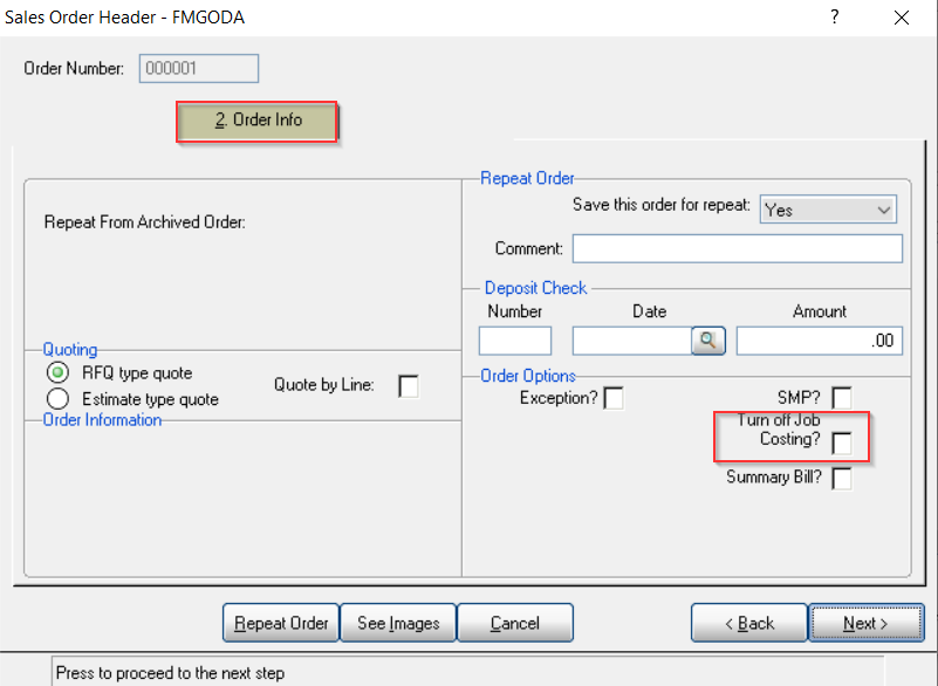
Sales Order Header - FMGODA — Turn off Job Costing?
💡 Note: When job costing feature is disabled on an order, additional care will need to be taken to make sure that the costs are correctly allocated to both the General Ledger account for Inventory and the items in question thru an inventory transaction entry.
Frequently Asked Questions
Q: Why would I need to disable Job Costing on an order?
A: Job Costing normally restricts a Bill as Ship order to one custom item per sales order number. If you need multiple custom items on the same Bill as Ship order (for example, wearables), you'll need to turn off Job Costing for that order.
Q: How do I get access to the Job Costing flag on an order?
A: An application security setting by operator, on the 4th panel — "Allow access to the Job costing Flag on the Order entry Header?" — must be checked for that operator.
Q: When does this apply?
A: Only to Bill as Shipped Orders.
Q: When do I need to check the Turn off Job Costing box?
A: Before leaving the order header — it must be checked at that point to take effect.
Q: What extra care is needed once Job Costing is disabled on an order?
A: You'll need to make sure costs are correctly allocated to both the General Ledger Inventory account and the specific items in question, through an inventory transaction entry.
Tags: order-processing, job-costing, bill-as-ship, custom-items, DB-distributor