
DBD: Order Processing: Prepaid Postage Direct Mail
DBD: Order Processing - Direct Mail Orders With Prepaid Postage
🔵 Overview Prepaid Postage is really a sort of inventory. You need to track what comes in and what goes out. Often times you may wish to provide your customer with reporting of these transactions. We are recommending the following procedure.
One-Time Setup
- Set up a warehouse code to track the postage. You can use any code that begins with a nine that is not being used for other, more typical, customer owned inventory. For example, you might use 9500. The description might be Customer Prepaid Postage. This same warehouse will be used for all customers, so you need only set up one.
- Set up a vendor for the US Postmaster. You will use this if the check was made payable directly to them. Set up a vendor for yourself, if the customer has made the check payable to you. Again these will be used for all customers.
- Set up a special charge code of "POST". Description should be "Add'l Postage Req'd over Deposit".
Setup for Each Customer
- Set up a vendor in Vendor Setup and Inquiry for your customer. This will be necessary because you may be issuing a Postage Deposit Refund at times to your customer. You can do this at the time a refund becomes necessary.
- Set up an item in inventory for Customer Prepaid Postage. Set this item to track Lot Detail. You can do this while recording the receipt, as DemandBridge provides for automatic setup during most entries.
Processing
At the time you get a postage deposit from your customer, enter an Inventory Transaction — Transaction Type should be set to 'Receive' to record the receipt. Enter the sales order under in the job field so that you can track each postage deposit separate from others. You will be receiving this monetary inventory into customer owned goods, so the Inventory Transaction entry will not attempt to make any journal entry.
If the check was made payable to the U.S. Postmaster, you will not need to make any other entry. If the check was made payable to you, you will need to record the deposit in cash receipts. In that instance you will post to a general ledger account called "Customer Postage Deposits". You can post directly to this account during cash receipts. When you view or print the detail of what has posted to this G/L account you will see the following data:
Date        Source journal   Customer check # and name                    Amount
07/17/2010  AR 0007.02       CR 019283 / 00001 American Advertising, Inc.  $5,000
07/29/2010  AP 0027.02       MP 900 US Postmaster /I# American Adv         $5,000
The first line is an example of the deposit you made. Note that it references the customer's check number and their name. The second line is an example of the check you wrote to forward the postage dollars on to either the US Postmaster (as in this case) or the Mail Supply House if that was the payee. By entering the Customer name in the invoice comment, you will also see on whose behalf the check was written.
💡 Note: This part of the procedure only applies when you have to deposit your customer's check and then write a check on their behalf to someone else.
In all instances, there are inventory reports that will show details regarding the activity by customer for postage — everything that came in via a Transaction entry and everything that went out via your final billing to the customer for the order or via the refund for the overpayment.
Recap
- Enter receipts of customer deposits — via a Transaction Entry and, if the check was made payable to your company, you also deposit the check into your account so a cash receipt entry is also made.
- Enter payments you make — to the US Postmaster or to your mail house via a cash disbursement. Reference the customer in the Invoice Comment Field.
- As postage is used — enter a line item in order entry and/or billing, to relieve the inventory of postage. Since it is customer owned, no dollar amount will extend or add to the invoice amount.
- If more postage is used than was on deposit — enter a second line during order entry and/or billing with the special charge code "POST". The description "Add'l Postage Req'd over Deposit" will automatically extend so that you do not have to enter any memo lines. Enter the amount of the additional postage needed.
- You can leave excess postage in their inventory for future orders, or if necessary, refund the postage to the customer. In the event a refund is necessary, enter an Inventory transaction entry — this time use an A-type for adjustment.
Example Inquiry Screens
Here is an example of one of the inquiry screens:
Customer code: 00100   Name: American Advertising, Inc.
Item code   P/C  Left-Rgt  Top-Botm  Plys  Description   UM: EACH  Qty/UM: 1
POSTAGE     900                             Postage
Location: 9500 Postage
Fiscal year: 2000   Accounting period: All

Date        Type       Reference      SJ Audit     Quantity
07/16/2010  R-Receipt  000001         IT 0003.01   5,000.00   .00
07/17/2010  R-Receipt  000002         IT 0004.01   5,000.00   .00
07/17/2010  A-Adjust   000004         IT 0006.01  -1,000.00   .00
07/16/2010  I-Release  Inv#: 0001151  SJ 0071.01  -4,000.00   .00
07/17/2010  I-Release  Inv#: 0001154  SJ 0071.01  -4,000.00   .00
This shows for Customer 100, American Advertising, Inc., for the year so far, we received two postage deposits (R-Receipt) for $5,000 each. We used 4,000 on two orders, one that was invoiced on invoice 1151 and one that was invoiced on invoice 1154. We also refunded $1,000.
For customer 200 we see the following:
Location: 9500 Postage
Fiscal year: 2000   Accounting period: All

Date        Type       Reference      SJ Audit    Quantity     Amount
07/17/2010  R-Receipt  000003         IT 0005.03   7,500.00    .00
07/17/2010  I-Release  Inv#: 0001155  SJ 0072.01  -5,500.00    .00
This customer has sent in one deposit for $7,500 and we billed for an order where we used $5,500.
The following inventory report shows summary activity information:
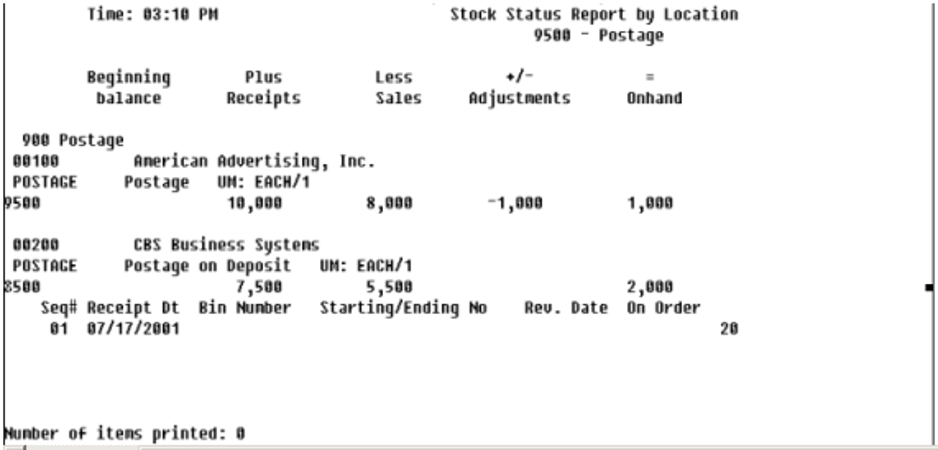
Stock Status Report by Location - 9500 Postage
Frequently Asked Questions
Q: What warehouse code should I use to track prepaid postage?
A: Any code starting with 9 that isn't already used for other customer owned inventory (e.g., 9500), described as Customer Prepaid Postage. This same warehouse is used for all customers, so it's a one-time setup.
Q: How do I record a postage deposit from a customer?
A: Enter an Inventory Transaction with Transaction Type set to 'Receive,' referencing the sales order in the job field. If the check was made payable to the U.S. Postmaster, no other entry is needed. If it was made payable to you, also record the deposit in Cash Receipts, posting to the 'Customer Postage Deposits' G/L account.
Q: How do I bill for postage as it's used?
A: Enter a line item in order entry and/or billing to relieve the inventory of postage — since it's customer owned, no dollar amount adds to the invoice.
Q: What if more postage is needed than what's on deposit?
A: Enter a second line with the special charge code 'POST,' which automatically pulls in the description 'Add'l Postage Req'd over Deposit,' and enter the additional amount needed.
Q: What happens to leftover postage?
A: You can leave it in the customer's inventory for future orders, or refund it using an Inventory transaction entry with an A-type (adjustment).
Q: How can I see a customer's postage activity for the year?
A: Use the inventory inquiry screens or the Stock Status Report by Location — these show receipts, releases (billings), and adjustments (refunds) by customer.
Tags: order-processing, prepaid-postage, direct-mail, customer-owned-inventory, inventory-transaction, DB-distributor