
PBL: Fixing Import Issue After Entering a Credit Card on File - System Crash / Nothing Imports
Alert: ⚠️ System Crash – What You Should Know
System crashes during payment import are rare and do not happen with every transaction. Occasionally, an order may "lock" or a record may remain in the semaphore table, which can prevent the import from completing. Clearing the semaphore resolves these temporary locks and ensures that your credit card is properly saved under the client. Following the steps in this guide will safely fix the issue while keeping the client experience seamless.
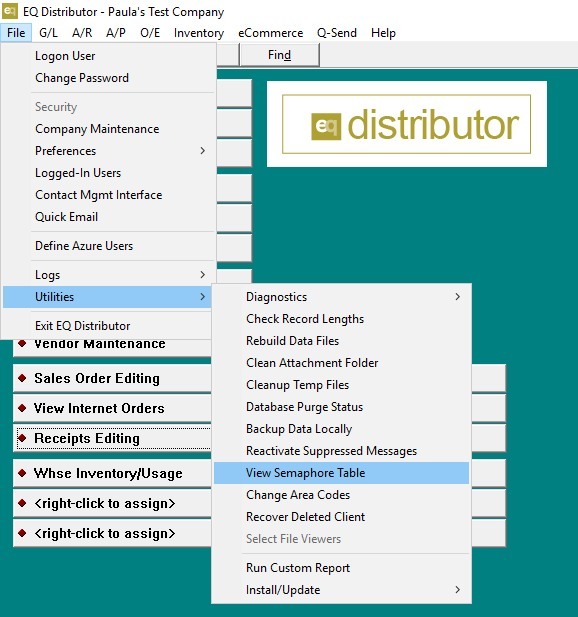
1. Go to File → Utilities → View Semaphore Table.
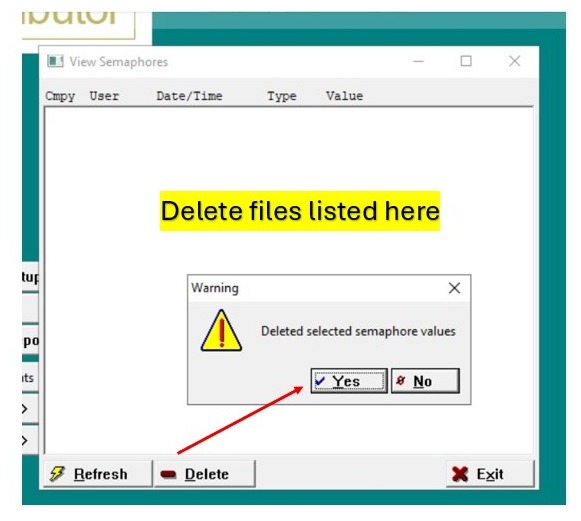
2. Delete everything listed in the table and try importing the card again.
Tip: Side Note (Explanation of Semaphore):
A semaphore is like a temporary "lock" that prevents multiple imports from running at the same time. If the system crashes during an import, this lock can remain, which stops future imports from completing. Clearing the semaphore removes the lock, allowing the import to process successfully.