
DBD: Inventory T Unit Of Measure
DBD: Inventory - T Unit Of Measure
🔵 Overview The 'T' unit of measure can be used when you have the situation where you need to price your items to your customer in Each's and more than 2 places beyond the decimal point is required. This unit of measure triggers the system to move the decimal point over 3 positions. All pricing displays as per thousand pricing.
Option for Unit Price on Invoice to Print as Decimal
The unit of measure would be setup like this.
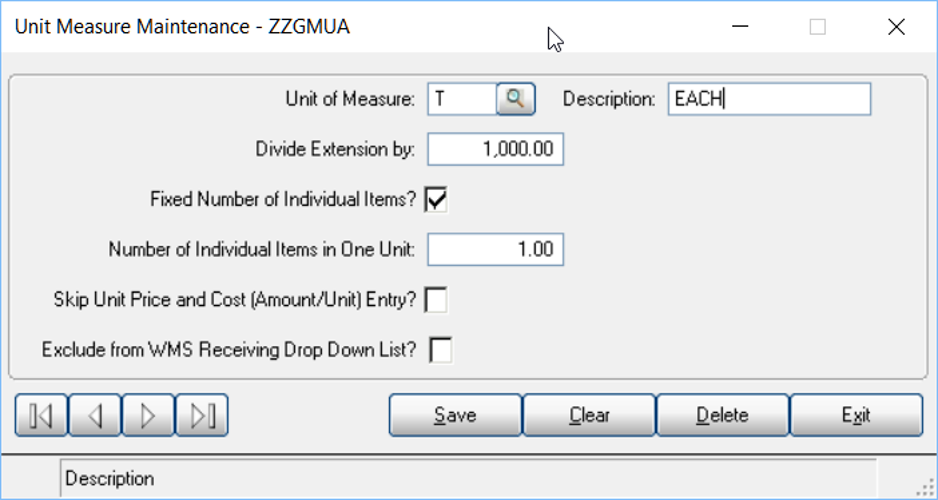
Unit Measure Maintenance - ZZGMUA — T unit of measure
Setup
To setup up this unit of measure in GUI — at the unit of measure field, select the Query button, then the folder to position you in the Unit of measure setup. Setup unit of measure as shown above.
You will need to go into Flexible formatting and make one change to your flexible format for your invoice. You will need to have a 'D' setup in the type field on field 31. When the invoice prints, it will move the positioning of the decimal point over three positions. In other words, if you have an item that would sell for $210.25 / M, it will display as .21025 EACH when it prints on the invoice.
The selling unit of measure will need to be setup as T in the customer item master for this form. If you wish to have the cost also display as EACH on the Purchase order to the vendor, T can also be used as the Cost Unit of measure as well (On PO — field 22 — Enter a D in the option field to recognize change).
The display on the screen in both order entry and billing will display as $210.25 / T.
💡 Note: By using the T unit of measure, this can help with rounding discrepancies when you purchase an item in M and then sell for fractional pennies.
Frequently Asked Questions
Q: When would I use the T unit of measure?
A: When you need to price items to your customer in Each's and need more than 2 decimal places — T triggers the system to shift the decimal point over 3 positions, displaying pricing as per-thousand.
Q: How does $210.25/M end up displaying as .21025 EACH on an invoice?
A: Once field 31 of your invoice's flexible format has type 'D' set up, the invoice printing shifts the decimal point three positions for items using the T unit of measure.
Q: Do I need to set this up on the item, or somewhere else too?
A: The selling unit of measure needs to be set to T in the customer item master. If you also want the cost to display as EACH on the vendor purchase order, use T as the Cost Unit of measure too, and enter D in the option field on PO field 22.
Q: What does the price look like on screen in Order Entry and Billing?
A: It displays as $210.25 / T — the decimal shift only happens on the printed invoice, not on the entry screens.
Q: What problem does the T unit of measure actually solve?
A: It helps avoid rounding discrepancies that come up when you purchase an item in M (thousands) but need to sell it for fractional pennies each.
Tags: inventory, unit-of-measure, t-unit, decimal-pricing, flexible-format, DB-distributor