
DBD: Inventory - Storage Expiration Date
This guide explains how DemandBridge calculates the Storage Expiration Date for inventory lots during the Purchase Order (PO) receiving process, and how to configure default storage durations at the customer level.
Primary Function: Automatically projects lot expiration timelines based on the expected number of months stock will be housed in the warehouse.
Step 1: Configuring Customer Storage Defaults
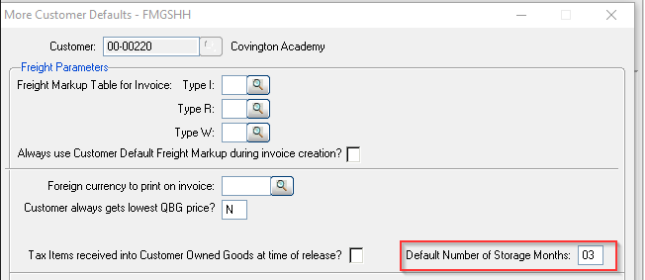
You can set a baseline storage duration for each customer profile so that it automatically applies to their incoming orders.
- Navigate to your customer profile settings.
- Open the More Customer Defaults panel.
- Locate the Default Number of Storage Months field.
- Parameter Rules: Valid entries range from 01 to 99. Entering a value here is optional. If left blank, the system automatically defaults to 01 (1 month) during transaction updates.
Step 2: Order Entry Mechanics & Overrides
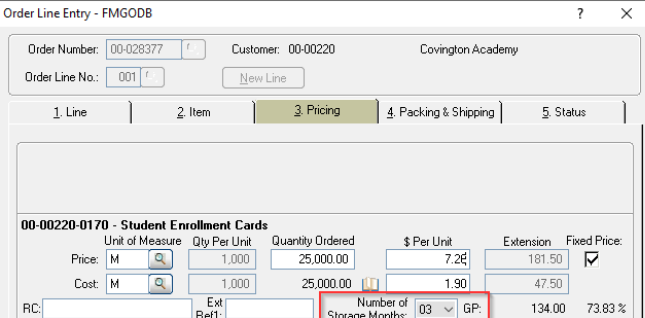
Once a customer default is established, the system uses it to streamline data entry during line processing.
- When a new order is initialized with a PO code, the system reads the customer code from the order header.
- The system automatically populates the No. Storage Months field on the Expanded Line Entry screen with that customer's default setting.
💡 Operational Flex: The automatically populated storage month value is not locked. Order entry teams can manually overwrite the No. Storage Months value directly on the line item if a specific batch requires a different timeline.
Step 3: PO Receiving and Lot Creation
The physical calculation of the expiration date occurs at the final stage of the procurement cycle.
- When a PO line item is systematically received and a new inventory lot is generated, the system reads the storage month integer tied to that line.
- The system dynamically calculates and applies the Lot Storage Expiration Date based on that duration.
- Default Fail-Safe: If the line item contains no value or was left at
0, the system automatically defaults to one month from the receipt date to calculate the expiration. - Date Adjustments: The generated Lot Storage Expiration Date field remains editable prior to posting, provided the active user account has the appropriate system permissions to modify lot metrics.
⚠️ Important: The calculated Lot Storage Expiration Date is not permanent until the PO Receiving Update routine is officially executed and posted.